Policy bindings
A binding connects one policy to one node group. Bindings are the only way policies reach nodes: a node receives a policy when the policy is released and has an enabled binding to at least one of the node's groups. This page explains how to create, enable, disable and delete bindings, how binding priority resolves conflicts between policies, and what agents receive when bindings change.
Open it from Policy -> Policy Bindings in the sidebar. Viewing bindings
requires binding:view.
The binding list
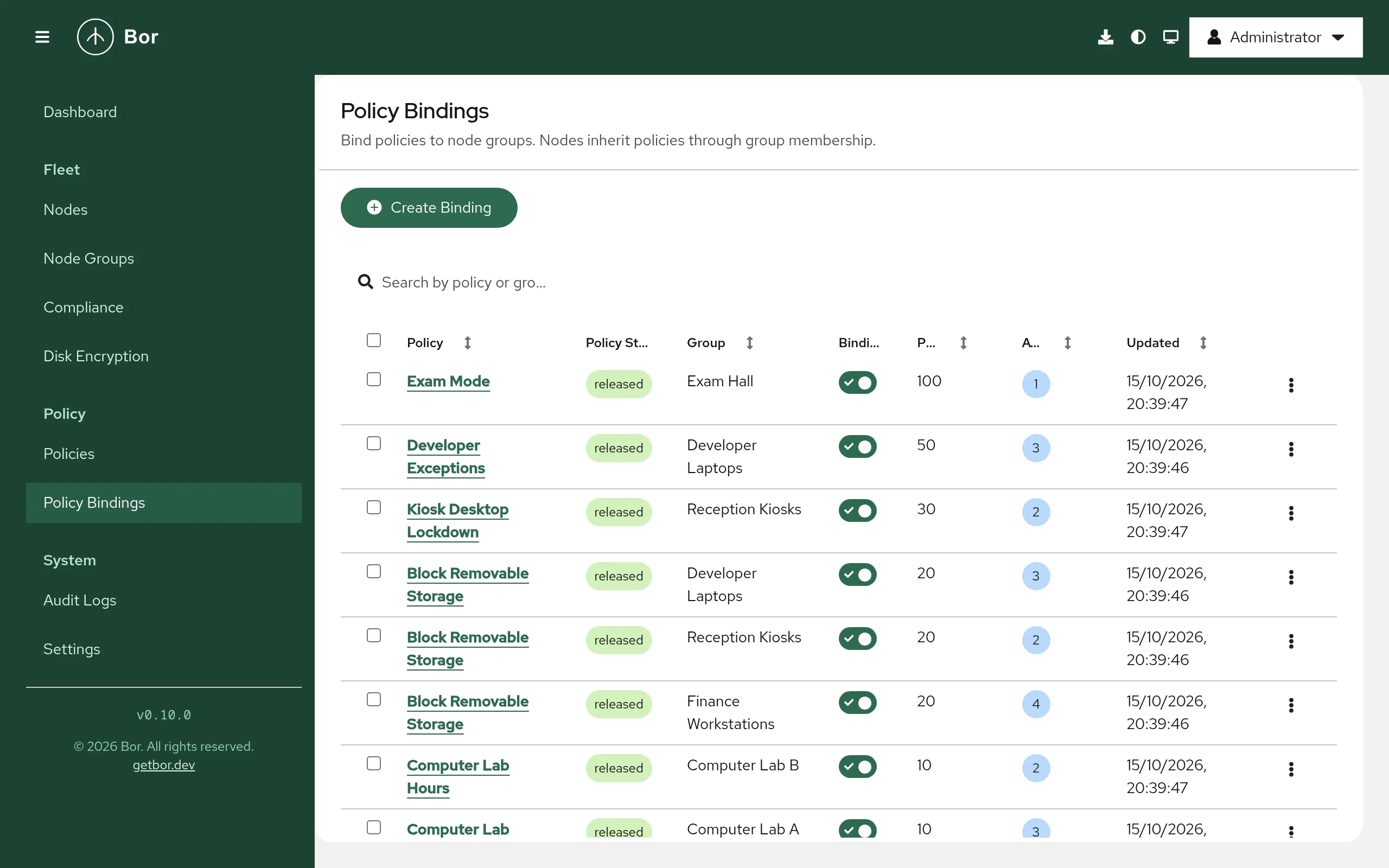
| Column | Content |
|---|---|
| Policy | The policy name. Select it to open the policy. Sortable. |
| Policy State | draft, released or archived. |
| Group | The node group. Sortable. |
| Binding State | A switch: on means enabled, off means disabled. |
| Priority | The binding priority (see below). Sortable. |
| Affected Nodes | Number of nodes in the group. Sortable. |
| Updated | Time of the last change. Sortable. |
Use Search by policy or group... to filter. The row menu offers Edit and Delete; tick several rows to use Actions for Edit (one row only) and Delete.
Create a binding
- Select Create Binding.
- Choose the Policy. The list shows every policy with its state in brackets.
- Choose the Node Group. The list shows the node count of each group.
- Set the Priority (default
0). See Priority and conflicts. - Select Create.
A new binding is always created disabled, whatever the Binding State switch in the form shows, so creating a binding never changes a node by itself. Enable it when you are ready.
You can bind a draft policy, but the binding cannot be enabled until the
policy is released. Creating bindings requires binding:create.
From the create-policy wizard
After creating a policy, Assign to a node group on the wizard's success page opens this form with the policy already selected.
Enable or disable a binding
Use the switch in the Binding State column:
- Enabling a binding delivers the policy to every node in the group.
When the group has nodes, Bor asks first (Enable this binding?) and
shows how many nodes are affected; select Enable. The policy must be
released; otherwise the server refuses with
binding can only be
  enabled when policy is released
. - Disabling a binding stops delivering the policy to the group. Nodes that get the policy through no other enabled binding remove its settings.
You can also change the state and the priority with Edit (the policy and node group of an existing binding cannot be changed; delete and recreate the binding instead), then select Save.
Enabling, disabling, editing and deleting bindings require binding:toggle.
Delete a binding
Select Delete, type the confirmation text shown in the dialog (<policy
name> to <group name>, or Yes for several bindings) and select
Delete. Deleting an enabled binding has the same effect on nodes as
disabling it.
Bindings are also removed automatically when their policy or their node group is deleted.
What agents receive
Agents keep a streaming connection to the server and receive changes in real time. When you enable, disable or delete an enabled binding, or change its priority, the server tells every connected agent in that node group to fetch a fresh snapshot of its policies. The agent then applies the new set: it writes the settings of newly delivered policies and removes the settings of policies it no longer receives. Each agent reports the result per policy, visible on the Compliance page within seconds.
The same happens when you change the state of a released policy that has enabled bindings. Offline agents receive the current set when they reconnect.
Note
A node's group memberships are read when its agent connects. After
adding a node to a group or removing it from one, restart the agent
(sudo systemctl restart bor-agent) or wait for its next reconnect. See
Nodes.
Priority and conflicts
A node often receives several policies of the same type, for example a
baseline Firefox policy from All Desktops and a stricter one from
Finance. The agent merges them into one configuration per type. Binding
priority is an integer; it influences the merge for some policy types.
Which priority counts
If the same policy reaches a node through several enabled bindings (the node is in several bound groups), the highest of those binding priorities is used for that policy on that node.
How each policy type uses priority
| Policy type | Merge behavior |
|---|---|
| Dconf | Policies are applied in ascending priority, so for the same schema, path and key the policy with the higher priority wins. |
| Package | Applied in ascending priority; for the same package or repository the higher priority wins. |
| Flatpak apps | Higher priority wins: remotes are de-duplicated by name and apps by app ID and scope, keeping the higher-priority entry. Auto-update and uninstall-unused are enabled if any policy enables them. Installation, update interval and operation timeout come from the highest-priority policy that sets them. |
| Firewall | List settings (services, ports and so on) are combined from all policies and de-duplicated; boolean settings are on if any policy turns them on; the zone target comes from the highest-priority policy that sets it. |
| Disk encryption | require_* settings and recovery key escrow are on if any policy turns them on; the rotation interval takes the smallest non-zero value; everything else, including the Tang server list, comes from the highest-priority policy that sets it. |
| Polkit | Each policy is written to its own rules file named after its priority (NNN-bor-<id>.rules, zero-padded). polkitd evaluates rules files in alphabetical order and the first matching rule wins, so the policy with the lower priority number is evaluated first. |
| Session Access | All rules from all policies are combined; priority is not used. |
| Firefox, Thunderbird, Chrome, Microsoft Edge, KDE Plasma | All policies are merged into one file per product; priority is not used and the merge order is not defined. List values from several policies are combined. |
Avoid overlapping settings
For the types where priority is not used, do not configure the same setting in two policies that can reach the same node: which value wins is not defined. Keep such settings in a single policy, or make sure the groups that receive the conflicting policies do not overlap.
Example
| Policy | Group | Priority |
|---|---|---|
| GNOME baseline (Dconf) | All Desktops | 0 |
| GNOME kiosk lock-down (Dconf) | Kiosks | 100 |
A node in both groups gets both policies. Where both set the same dconf
key, the kiosk value (priority 100) wins; all other keys from the
baseline still apply.