Thunderbird
The Thunderbird policy type manages Mozilla Thunderbird through the same
enterprise policy mechanism Firefox uses: Bor writes a policies.json file
that Thunderbird reads at startup and applies to every profile on the node.
This page describes the available settings, the files on the endpoint, the
editor, merging behavior and how to verify the result.
Note
The Thunderbird type manages application policies (updates, security, add-ons, network). It does not create or configure mail accounts.
What it controls
| Group | Settings |
|---|---|
| Updates | Disable App Update, App Auto Update, Background App Update, Manual App Update Only, App Update Pin, App Update URL |
| Privacy & Telemetry | Disable Telemetry |
| Security | Disable Password Reveal, Disable Master Password Creation, Primary Password, Password Manager Enabled, Offer To Save Logins, Offer To Save Logins Default, Disable Security Bypass, SSLVersion Min, SSLVersion Max |
| Restrictions | Block About Addons, Block About Config, Block About Profiles, Block About Support, Disable Safe Mode |
| Developer Tools | Disable Developer Tools |
| Add-ons | Disable System Addon Update, Extension Update, Extensions (install, uninstall and locked lists) |
| Network | DNSOver HTTPS, Proxy, Hardware Acceleration, Network Prediction, Captive Portal |
| General | Prompt For Download Location, Default Download Directory, Download Directory, Disable Builtin PDFViewer, Requested Locales |
| Cookies | Cookies (allow, block and session lists, behavior, lock) |
| Authentication | Authentication (SPNEGO, delegated and NTLM host lists, non-FQDN and proxy options, lock) |
| Search | Search Engines (add, remove, default, prevent installs) |
Every setting maps to the Thunderbird enterprise policy of the same name.
The server validates SSLVersion Min / SSLVersion Max (tls1,
tls1.1, tls1.2, tls1.3), the proxy Mode (none, system,
manual, autoDetect, autoConfig) and the DNS-over-HTTPS provider URL
(http or https).
Files on the endpoint
| Installation | File | Agent config key |
|---|---|---|
| Distribution package | /etc/thunderbird/policies/policies.json |
thunderbird.policies_path |
Flatpak (net.thunderbird.Thunderbird) |
/var/lib/flatpak/extension/net.thunderbird.Thunderbird.systemconfig/<arch>/stable/policies/policies.json |
thunderbird.flatpak_policies_path |
<arch> is x86_64 on amd64 and aarch64 on arm64 nodes.
The file has the same layout as the Firefox one: a _comment key that marks
it as managed by Bor and a policies object with the merged settings.
Writes are atomic, the file mode is 0644 and missing directories are
created.
Before the first write the agent saves any existing system file as
policies.json.bor-backup. When the last Thunderbird policy stops applying,
the original is restored (or the file is deleted if there was none). The
Flatpak copy is deleted.
To change a path or switch off the Flatpak copy, edit /etc/bor/config.yaml
and restart the agent:
The Flatpak write is best effort: if it fails, the agent logs a warning and still reports the policy as deployed.
Create a Thunderbird policy
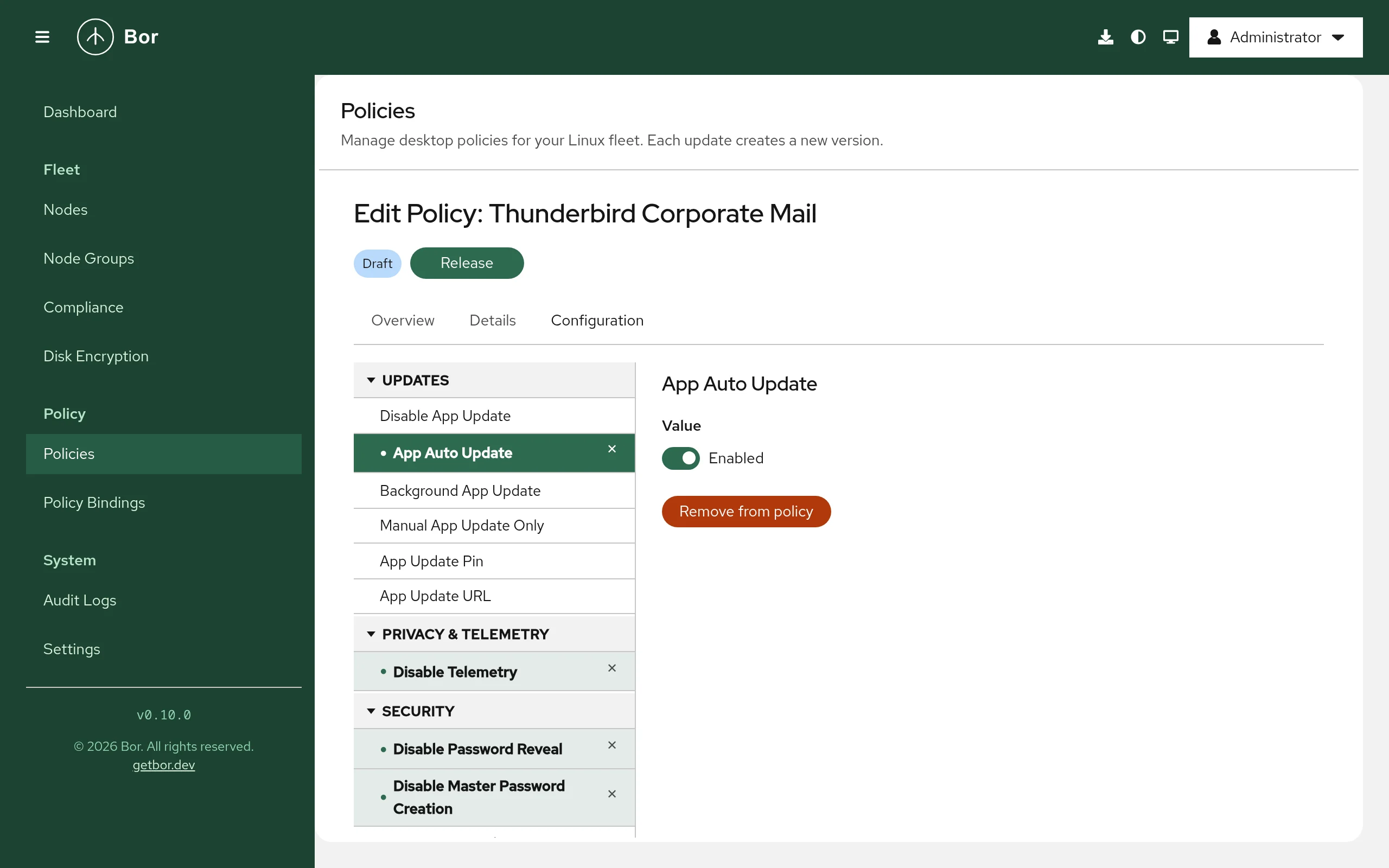
- Go to Policies and click Create a policy.
- Choose Thunderbird on the Type step and fill in Name and Description on the Details step.
- On the Configuration step pick settings from the tree. A selected setting is only a preview until you change its value or click Add to policy; Remove from policy takes it out again.
- Review, create and release the policy, then bind it to a node group (see bindings).
Value editors work the same as for Firefox: switches for on/off settings, drop-down lists for fixed values, one item per line for lists and one field per sub-setting for composite settings.
Examples
Disable telemetry and lock updates to a version
| Group | Setting | Value |
|---|---|---|
| Privacy & Telemetry | Disable Telemetry | Enabled |
| Updates | App Update Pin | 128. |
App Update Pin keeps Thunderbird on the given version prefix when it updates itself.
Require TLS 1.2 or newer
Group Security: set SSLVersion Min to tls1.2.
Enable Kerberos single sign-on for internal servers
Group Authentication, setting Authentication:
| Field | Value |
|---|---|
| SPNEGO | .example.com |
| Locked | Yes |
This lets Thunderbird use Kerberos (SPNEGO) with servers under
example.com and prevents users from changing the list.
How multiple Thunderbird policies are merged
Merging works exactly as for Firefox: composite settings are merged field by field, lists are concatenated, and when two policies set the same single value differently the result is not defined. Binding priority is not used. Keep each setting in one policy.
What users see
Thunderbird reads its policies at startup. After a change the agent can notify logged-in users to restart Thunderbird (Settings -> Agent Notifications, Thunderbird policy notification message).
Thunderbird shares the Firefox policy engine, including the
about:policies page that lists the active policies and any errors.
Locked preferences cannot be changed in the Thunderbird settings.
Verify on the node
sudo cat /etc/thunderbird/policies/policies.json
python3 -m json.tool /etc/thunderbird/policies/policies.json > /dev/null && echo OK
sudo journalctl -u bor-agent | grep -i thunderbird
The agent logs Thunderbird policies synced to ... after a successful
sync, and the policy is reported Compliant with the message Deployed.
Troubleshooting
The policy is compliant but Thunderbird does not apply it. Compliance
only confirms that the file was written. Restart Thunderbird and look at
about:policies; settings that the installed version does not support are
listed under Errors. If your Thunderbird build reads its policies from a
different location, change thunderbird.policies_path.
Edits to policies.json are reverted. The file is tamper-protected; the
agent restores it and logs a tamper_detected event in the
audit log.
Non-compliant with "failed to sync Thunderbird policies". The message
includes the file system error. Check sudo journalctl -u bor-agent.