KDE Plasma (Kconfig)
The KDE Plasma policy type (technical name Kconfig) manages KDE Plasma
5 and 6 desktops through KDE's Kiosk framework. Bor writes system-wide KDE
configuration files, optionally marked immutable with KDE's [$i] marker,
so users cannot override them in their own ~/.config files. This page
explains the settings, the files on the endpoint, the editor, merging and
how to check the result on a Plasma desktop.
What it controls
| Group (in the editor) | Settings | KDE file and group written |
|---|---|---|
| Action Restrictions | Shell Access, Run Command (KRunner), Logout Action, File New Action, File Open Action, File Save Action | kdeglobals, [KDE Action Restrictions] keys shell_access, run_command, action/logout, action/file_new, action/file_open, action/file_save |
| System Settings Restrictions | System Settings Modules | /etc/kde5rc and /etc/kde6rc, [KDE Control Module Restrictions] |
| Resource Restrictions | Wallpaper Changes, Icon Changes, Autostart Changes, Color Scheme Changes, Cursor Theme Changes | kdeglobals, [KDE Resource Restrictions] keys wallpaper, icons, autostart, colors, cursors |
| Window Manager | Borderless Maximized Windows | kwinrc, [Windows] |
| Desktop | Unlock Desktop Widgets, Configure When Locked | plasmarc, [General] keys plasmoidUnlockedDesktop, allow_configure_when_locked |
| Screen Lock | Auto Lock, Lock on Resume, Lock Timeout (seconds) | kscreenlockerrc, [Daemon] keys AutoLock, LockOnResume, Timeout |
| Appearance | Icon Theme, Wallpaper Plugin, Wallpaper Image Path, Wallpaper Fill Mode, Wallpaper Background Color | kdeglobals [Icons]; plasma-org.kde.plasma.desktop-appletsrc |
| Security | URL Restrictions | kdeglobals, [KDE URL Restrictions] |
Boolean settings are written exactly as you set them (true or false).
In KDE Kiosk, setting an action or resource key to false restricts
it: shell_access=false removes terminal access, run_command=false
disables KRunner's command execution, wallpaper=false stops users from
changing the wallpaper.
Screen lock timeout
The value of Lock Timeout (seconds) is written unchanged as
Timeout= in kscreenlockerrc. KDE interprets that key in minutes, so
enter the number of minutes after which the screen should lock.
Wallpaper image
The Wallpaper Image Path setting does not currently take effect reliably on Plasma desktops. Do not rely on it to brand desktops; the Wallpaper Changes restriction works as expected.
Files on the endpoint
| Path | Content | Config key |
|---|---|---|
/etc/bor/xdg/<file> (for example kdeglobals, kwinrc, plasmarc, kscreenlockerrc) |
System-wide KDE settings from all KDE Plasma policies | kconfig.config_path (default /etc/bor/xdg) |
/etc/profile.d/99-bor.sh |
Puts the Bor directory first in XDG_CONFIG_DIRS |
Follows kconfig.config_path |
/etc/kde5rc, /etc/kde6rc |
System Settings module restrictions (same content in both) | Fixed |
The profile script contains:
KDE searches XDG_CONFIG_DIRS for system-wide configuration, so the files
in /etc/bor/xdg take precedence over distribution defaults in /etc/xdg.
The variable is set at login, so users must log out and back in once
after the first KDE Plasma policy reaches a node.
Every file written by the agent starts with a header:
# This file is managed by Bor. Do not edit manually.
# Changes will be overwritten by policy enforcement.
Backups. Before writing a file for the first time, the agent copies
any existing file to <file>.bor-backup (an empty backup means the file
did not exist). The backup files are also how the agent remembers which
files it manages. When a file is no longer needed, or the last KDE Plasma
policy is removed, the original is restored or the file is deleted. The
profile script stays in place.
Create a KDE Plasma policy
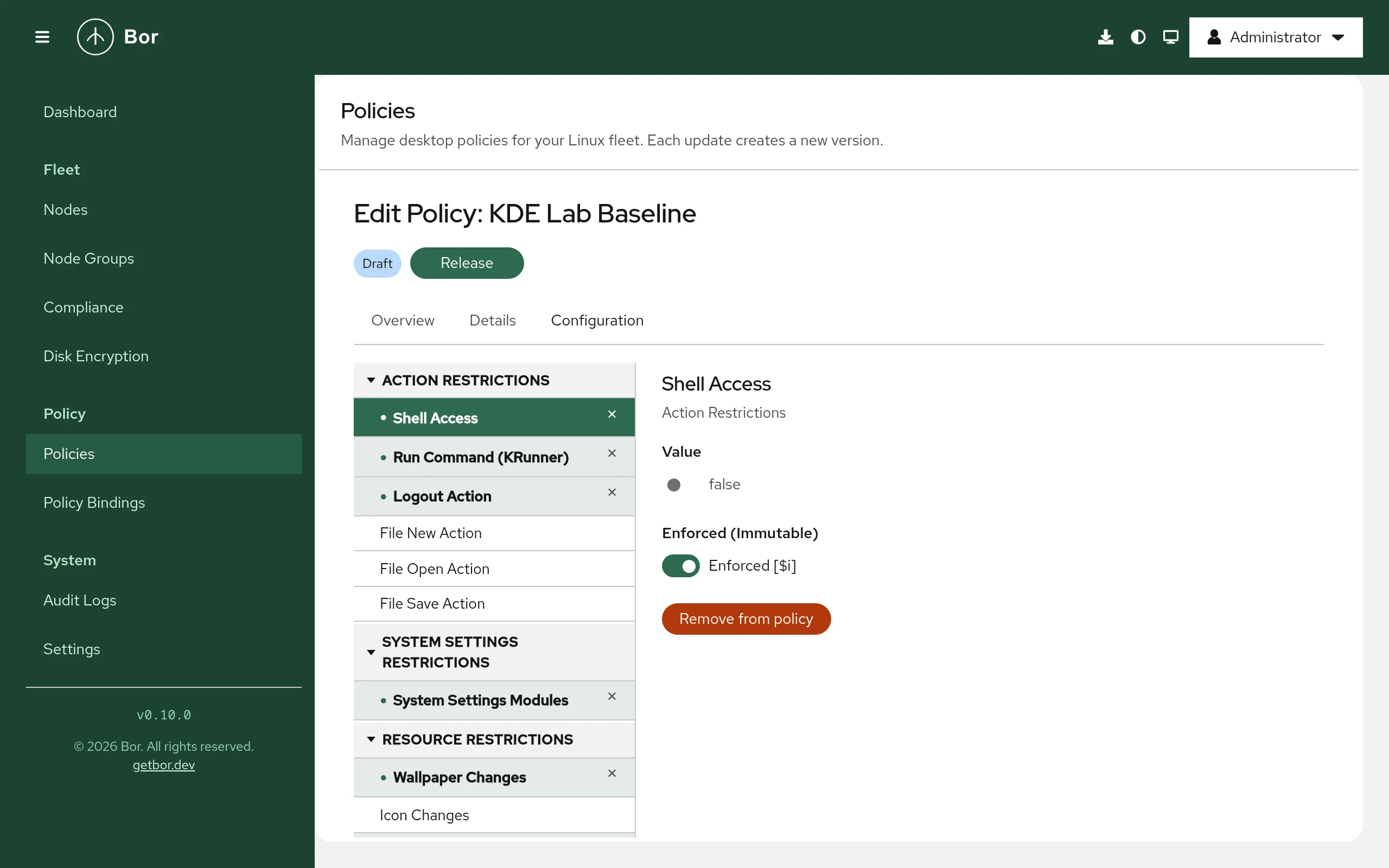
- Go to Policies and click Create a policy, then pick KDE Plasma on the Type step.
- Enter a Name and Description on the Details step.
- On the Configuration step pick a setting from the tree on the left.
For a plain setting the right side shows:
- Value: a switch for booleans, a text or number field, a
drop-down for the fill mode, or a color picker (stored as
R,G,B). - Enforced (Immutable): when on (Enforced [$i]), the entry is written with KDE's immutability marker and users cannot override it. When off (Not enforced), the value is only a system default that users may change. New settings start as enforced.
- Add to policy / Remove from policy.
- Value: a switch for booleans, a text or number field, a
drop-down for the fill mode, or a color picker (stored as
- System Settings Modules has its own editor: pick modules from
Add module (each entry shows its description and module ID, for
example
Autostart Applications (kcm_autostart)), or open Add custom modules and enter module IDs separated by commas or new lines, then click Add. - URL Restrictions has a rule editor: click + Add Rule and set
Action (
open,listorredirect), Protocol, Host, Path and Access (Allow or Deny). Blank fields match everything. Referrer Matching (advanced) restricts the rule to requests coming from a given protocol, host or path. - Review, create and release the policy, then bind it to a node group.
URL restrictions and System Settings module restrictions are always written as enforced.
Examples
Disable terminal access and KRunner commands
| Setting | Value | Enforced |
|---|---|---|
| Shell Access | false |
Enforced [$i] |
| Run Command (KRunner) | false |
Enforced [$i] |
/etc/bor/xdg/kdeglobals then contains:
When every entry in a group is enforced, the whole group is marked [$i];
otherwise only the enforced keys are marked (shell_access[$i]=false).
Prevent wallpaper changes
| Setting | Value | Enforced |
|---|---|---|
| Wallpaper Changes | false |
Enforced [$i] |
Hide System Settings modules
System Settings Modules: add kcm_autostart (Autostart Applications),
kcm_kded (Background Services) and kcm_krdpserver (Remote Desktop).
/etc/kde5rc and /etc/kde6rc then contain:
The modules disappear from System Settings and cannot be opened with
kcmshell.
Deny browsing Windows shares
URL Restrictions, + Add Rule: Action list, Protocol
smb, Host and Path blank, Access Deny. Bor writes:
How multiple KDE Plasma policies are merged
All KDE Plasma policies that apply to a node are written into the same set of files:
- Settings from different policies are combined into their files and groups.
- URL restriction rules from all policies are collected and renumbered
(
rule_1,rule_2, ...), with onerule_count. - System Settings module lists are combined.
- Binding priority is not used. If two policies set the same key, both values end up in the file and which one KDE uses is not defined. Set each key in one policy only.
What users see
- Restricted actions disappear or are disabled (for example the terminal shortcut or KRunner command execution), and restricted System Settings modules are hidden.
- Enforced settings are locked: the corresponding controls in System Settings are disabled or missing, and edits to the user's own config files have no effect.
- After a change, the agent asks KWin, the Plasma shell and the screen locker to reload their configuration, and can show a desktop notification (default text: "Desktop policies have been updated. Please log out and log back in for all changes to take effect."). Configure it under Settings -> Agent Notifications.
Some settings are only read when Plasma starts; log out and back in to be sure everything applies.
Verify on the node
# Files written by the agent and their backups
ls -la /etc/bor/xdg/
sudo cat /etc/bor/xdg/kdeglobals
cat /etc/kde6rc

# The search path a new login shell gets
bash -lc 'echo $XDG_CONFIG_DIRS'

# Read a value as KDE sees it (run as the desktop user, inside the session)
kreadconfig6 --file kdeglobals --group "KDE Action Restrictions" --key shell_access
On Plasma 5 use kreadconfig5. In the web UI the policy is reported
Compliant with the message Deployed once the files are written.
Troubleshooting
Nothing changes on the desktop.
- Make sure the user logged in again after the first policy arrived, so
that
/etc/profile.d/99-bor.shsetXDG_CONFIG_DIRS. Check withecho $XDG_CONFIG_DIRSin a terminal of the session (if one is allowed), orcat /proc/<pid-of-plasmashell>/environ | tr '\0' '\n'. - Display managers or session wrappers that do not source
/etc/profile.ddo not see the Bor directory. - Compliance for this type only confirms the files were written.
A setting is shown but users can still change it. Turn on Enforced (Immutable) for that setting. Non-enforced values are defaults only.
System Settings still shows a restricted module. Check that the module
ID is correct (it must match the module's ID, for example kcm_autostart)
and that /etc/kde5rc / /etc/kde6rc contain it. Restart System Settings.
Files were changed back after editing them. Files under /etc/bor/xdg,
/etc/kde5rc and /etc/kde6rc are tamper-protected. The agent restores
them and records a tamper_detected event in the
audit log.