Flatpak apps
The Flatpak apps policy type (technical name Flatpak) manages Flatpak on
your nodes: which remotes (repositories) are configured, which applications
must be installed, kept up to date or removed, and how updates are handled.
The Bor server keeps a searchable application catalog (Flathub out of the
box) so you pick applications by name instead of typing IDs.
This page covers the policy editor, the server-side catalog under Settings -> Flatpak Repositories, what the agent does on the endpoint, and how to verify and troubleshoot it.
What it controls
- Remotes in the node's system Flatpak installation (or a named system installation): URL, title, GPG key, subset, priority, enabled state, local allow/deny filter, and app-store visibility.
- Applications: installed (Present), installed and updated on every sync (Latest), or removed (Absent).
- Updates and cleanup: an optional periodic
flatpak updateandflatpak uninstall --unused.
Typical uses: a standard desktop where Firefox and LibreOffice come from Flathub and stay current; a lab where only an allow-list of applications can be installed; removing an application from an entire fleet.
Endpoint prerequisites
- The
flatpakpackage. Nodes without it report the policy as inapplicable (flatpak is not installed on this node). The agent does not install Flatpak for you. - Network access from the node to each remote's URL (for Flathub,
dl.flathub.org), directly or through a proxy configured withflatpak.proxy_url. - Only the system installation (
/var/lib/flatpak) or a named system installation is enforced. Application entries with the User scope are accepted by the server but reported as inapplicable by the agent.
Agent configuration
These keys go in /etc/bor/config.yaml under flatpak:. All are optional.
| Key | Default | Description |
|---|---|---|
flatpak.binary |
flatpak |
The flatpak executable, resolved through PATH. |
flatpak.state_dir |
/etc/bor/flatpak |
Where the agent writes the managed remote definitions (.flatpakrepo, .filter, .gpg). |
flatpak.state_file |
/var/lib/bor/agent/flatpak-state.json |
Records which remotes Bor created or adopted, so removal can undo exactly what Bor did. |
flatpak.proxy_url |
(empty) | HTTP(S) proxy exported to flatpak as http_proxy/https_proxy for downloads. |
How the agent applies a policy
The agent runs as root and drives the flatpak command line with fixed,
validated arguments. Every value that reaches a command line or a file name
(remote names, application IDs, branches, filter refs) is validated on the
server and again on the agent. Commands run with --noninteractive and
--assumeyes.
Each sync runs in two phases and never blocks other policy types:
- Remotes. For each remote, the agent writes
/etc/bor/flatpak/<name>.flatpakrepo, plus<name>.filterwhen a filter is configured and<name>.gpgwhen a key is supplied. A missing remote is added withflatpak remote-add --if-not-exists --from <name> <file>. An existing remote is adopted: the agent records its original settings in the state file and applies only theflatpak remote-modifyflags needed to reach the desired state (for example--subset,--filter,--prio,--enable/--disable,--gpg-import). A distribution's pre-configuredflathubremote is therefore adopted rather than duplicated. The remote results are reported immediately. - Applications. The agent reads installed applications with
flatpak list --appand runs only what is needed:flatpak installfor Present,flatpak install --or-updatefor Latest,flatpak uninstall(with--delete-dataif requested) for Absent. It then re-checks the result and reports compliance again. If Remove unused runtimes is on,flatpak uninstall --unusedruns afterwards.
Each install, update or uninstall is limited by the Operation timeout (default 30 minutes). Only one Flatpak sync runs at a time.
Auto update. When any bound policy enables it, the agent runs
flatpak update on the configured interval (default every 24 hours), then
flatpak uninstall --unused if enabled, re-checks the applications and
reports compliance.
Agent restarts
The bor-agent unit gives running operations up to 120 seconds
(TimeoutStopSec=120) to stop cleanly. An interrupted install is retried
on the next sync.
Create a Flatpak policy
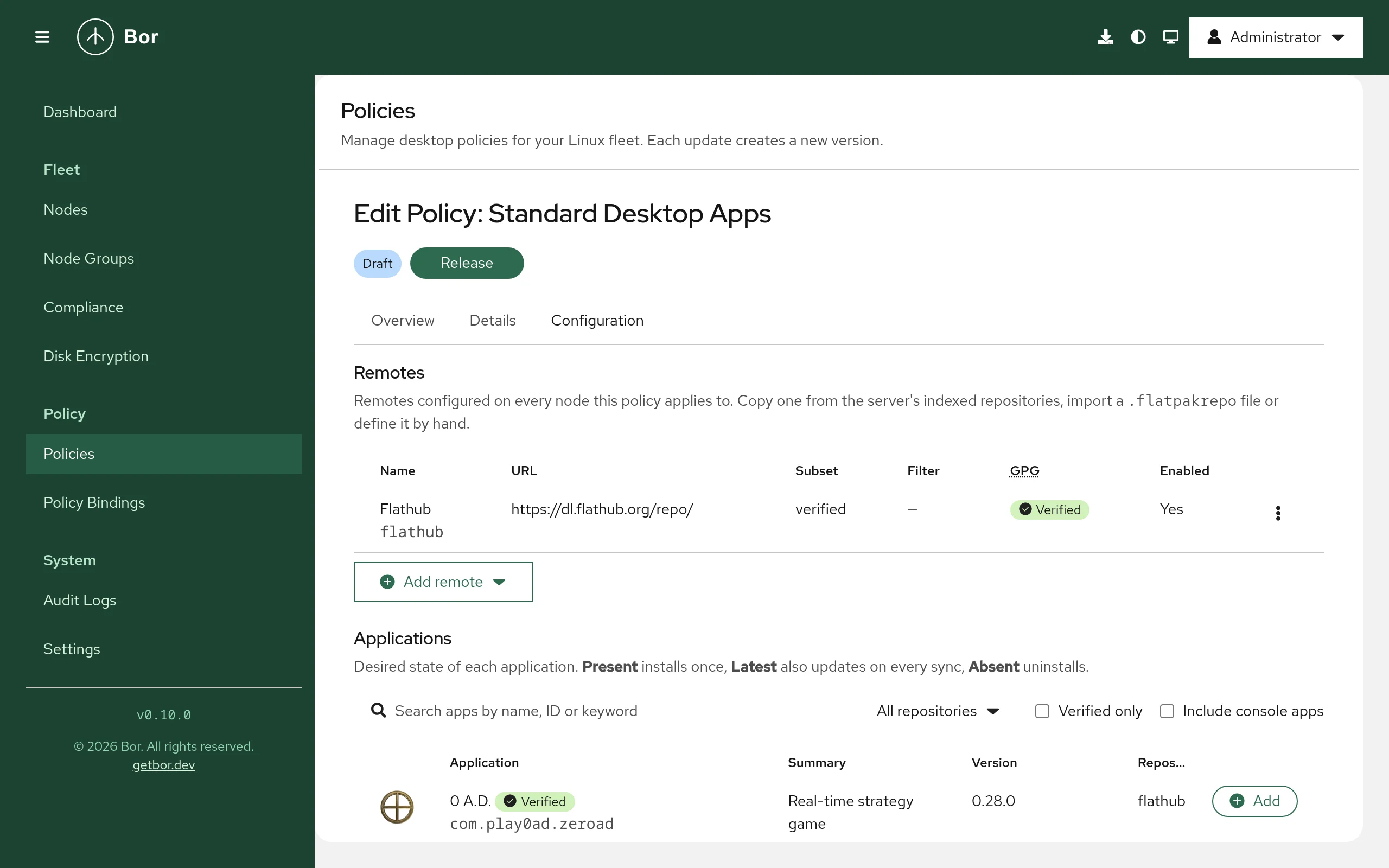
- Open Policies, click Create a policy and choose Flatpak apps.
- Add remotes, applications and options as described below. The policy needs at least one remote or one application.
- Save, Release and bind the policy to node groups (see Policies and Bindings).
Remotes
Under Remotes, click Add remote and choose:
- From server repository... - copies a repository from the server catalog (URL, GPG key, subset and so on) into the policy.
- From .flatpakrepo URL... - fetches and parses a
.flatpakrepofile, including its GPG key. - Custom... - enter every field yourself.
The remote dialog contains:
| Field | Description |
|---|---|
| Remote name | The name on the node, for example flathub. Letters, digits, ., _, -; up to 64 characters; must start with a letter or digit. |
| Repository URL | https:// or oci+https:// only. |
| Title | Display name. |
| Subset | All apps, verified, floss, verified_floss, or Custom subset... Flathub publishes these subsets to restrict what the remote offers. |
| GPG | Upload the key file or paste the base64 GPGKey= value. Disable GPG verification for this remote (not recommended) turns verification off and is permanently reported as non-compliant. |
| Key fingerprint (optional) | 40 hexadecimal characters. |
| Local filter | No filter, Allow list (deny everything except runtimes and the listed refs) or Deny list (allow everything except the listed refs). Add refs such as app/org.gnome.* or org.signal.Signal/*/stable. |
| Priority | Flatpak remote priority (--prio), 0-1000; 0 means Flatpak's default. Higher wins when several remotes offer the same ref. |
| Enabled | Remote is enabled on the node. Unchecked keeps the remote configured but disabled. |
| Advanced | Default branch, Collection ID, Homepage, Comment, Hide from app stores (no-enumerate), Do not use for runtime dependencies (no-use-for-deps). |
Allow lists never block the policy itself
In Allow list mode the agent writes deny * and allow runtime/*,
then one allow line per listed ref, and automatically adds an allow
line for every Present or Latest application in the policy that
uses this remote.
Applications
Under Applications, search the catalog by name, ID or keyword (filter by repository, Verified only, Include console apps) and add the results. Applications from remotes the server does not index can be added by ID (Add by ID, e.g. com.example.App). Each row has:
- State - Present (install if missing), Latest (install and update on every sync) or Absent (uninstall). With Absent, Also delete app data removes the application's data as well.
- Remote - the remote to install from. Name it whenever more than one remote could provide the application; in non-interactive mode Flatpak does not choose between ambiguous remotes.
- Branch - empty for the remote's default branch.
- Scope - System. Entries with the user scope (possible in JSON) are reported inapplicable.
- Optional - an application that its remote does not offer is reported as inapplicable instead of non-compliant.
Options
- Update installed Flatpak apps automatically and Update interval (hours) (1-168, default 24).
- Remove unused runtimes after changes and updates.
- Advanced -> Installation name: a named system installation from
/etc/flatpak/installations.d; nodes without it report the policy as inapplicable. Operation timeout (minutes): 5-240, default 30.
Setting reference
Policy content is the FlatpakPolicy message as JSON (camelCase field
names, enum values as strings).
| Field | Description |
|---|---|
remotes[] |
name, url, title, enabled, gpgVerify, gpgKeyData (base64, max 64 KiB), gpgKeyId, subset, defaultBranch, priority, filterMode (FLATPAK_FILTER_MODE_NONE, _ALLOWLIST, _DENYLIST), filterRefs, noEnumerate, noUseForDeps, collectionId, homepage, comment |
apps[] |
appId, remote, branch, state (FLATPAK_APP_STATE_PRESENT, _LATEST, _ABSENT), scope (FLATPAK_SCOPE_SYSTEM, FLATPAK_SCOPE_USER), optional, deleteData |
installation |
Named system installation; empty = default system installation. |
autoUpdate, autoUpdateIntervalHours |
Periodic update; interval 1-168 hours, 0 = 24. |
uninstallUnused |
Run flatpak uninstall --unused after changes and updates. |
operationTimeoutMinutes |
5-240, 0 = 30. |
If gpgVerify is true the remote must include gpgKeyData.
The schema also contains fields that the server accepts but agents do not
enforce yet: maskUpdates and commit on applications, and
removeUnmanagedRemotes, removeUnlistedApps, languages,
extraLanguages, ensureFlatpakInstalled, restrictLocalAdminChanges and
reportOsInfo on the policy. Do not rely on them.
Example: standard desktop applications, kept current
{
  "remotes": [
    {
      "name": "flathub",
      "url": "https://dl.flathub.org/repo/",
      "title": "Flathub",
      "enabled": true,
      "gpgVerify": true,
      "gpgKeyData": "<base64 keyring copied from the server catalog>",
      "subset": "verified"
    }
  ],
  "apps": [
    { "appId": "org.mozilla.firefox", "remote": "flathub", "state": "FLATPAK_APP_STATE_LATEST" },
    { "appId": "org.libreoffice.LibreOffice", "remote": "flathub", "state": "FLATPAK_APP_STATE_LATEST" }
  ],
  "autoUpdate": true,
  "autoUpdateIntervalHours": 24,
  "uninstallUnused": true
}
In practice, add the remote with From server repository... so the key is filled in for you.
Example: locked-down lab with an allow list
Same flathub remote, plus:
{
  "filterMode": "FLATPAK_FILTER_MODE_ALLOWLIST",
  "filterRefs": ["app/org.gimp.GIMP/*/*", "app/org.inkscape.Inkscape/*/*"]
}
With these applications set to Present, nothing else from Flathub can be installed system-wide on the node. Combine this with a Polkit policy (see Security considerations).
Example: remove an application fleet-wide
{
  "apps": [
    { "appId": "com.example.LegacyTool", "state": "FLATPAK_APP_STATE_ABSENT", "deleteData": true }
  ]
}
No remote is needed. Nodes without Flatpak report inapplicable; all others remove the application on the next sync.
Merge behavior
When several Flatpak policies apply to one node, they are processed in order of binding priority:
- Remotes are deduplicated by name; the entry from the higher-priority policy wins.
- Applications are deduplicated by application ID and scope; the higher-priority entry wins (so a higher-priority Absent overrides a lower-priority Present).
- Auto update and Remove unused runtimes are on if any policy enables them.
- Installation name, Update interval and Operation timeout come from the highest-priority policy that sets them.
Compliance
The agent reports one item per remote (schema flatpak:remote) and one per
application (flatpak:app); the policy status is the roll-up of all items.
Expand the node row on the Compliance page to
see them.
| Status | Typical causes |
|---|---|
| Compliant | Every remote is configured and every application is in its desired state. |
| Non-compliant | An application is missing from its remote (and not optional); a remote has GPG verification disabled (message GPG verification disabled, persists on purpose); a remote is marked no-enumerate locally and Flatpak cannot clear it; an operation succeeded but the state did not change. |
| Inapplicable | flatpak is not installed; the named installation does not exist; user scope; an optional application is not offered by its remote. |
| Error | An install, uninstall or remote operation failed (network, GPG, lock, timeout). The message carries the last line of Flatpak's output, for example flatpak install timed out after 30m0s. |
Tamper protection
While Flatpak policies are active, the files in /etc/bor/flatpak/ are
watched. If one is edited or deleted, the agent re-runs the Flatpak sync,
which rewrites the files and re-applies the remote settings, and records a
tamper_detected event in the audit log.
Flatpak's own configuration (/var/lib/flatpak/repo/config) is deliberately
not watched. A local change made with flatpak remote-modify is corrected
on the next sync (the next policy change, agent reconnect, or tamper event).
Unbind and delete
When the last Flatpak policy stops applying to a node:
- Remotes that Bor created are deleted with
flatpak remote-delete. If installed applications still depend on a remote, Flatpak refuses and the agent logscould not remove remote ... (apps may still use it). - Remotes that Bor adopted get their original URL, title, subset, filter, priority, enabled state and GPG verification back.
- All files in
/etc/bor/flatpak/and the state file are removed, and auto-update stops. - Installed applications are left in place. To remove applications, use an Absent entry before unbinding.
When a single remote is dropped from the policies while others remain, the same undo is applied to that remote only.
Server catalog: Settings -> Flatpak Repositories
The catalog is a server setting, separate from policies. It feeds the application search in the editor and provides ready-made remote definitions. Open Settings and select the Flatpak Repositories tab.
- Flathub is built in. It is indexed from
https://dl.flathub.org/repo/appstream/<arch>/appstream.xml.gzand cannot be deleted, only disabled. - Add repository accepts Import from .flatpakrepo URL, a preset
(Flathub Beta), or manual fields: Name (the remote name suggested to
policies), Title, Repository URL, GPG key, Subset,
Architectures, Refresh interval (hours), AppStream URL override,
and Index this repository's applications. A repository is indexed from
<url>/appstream/<arch>/appstream.xml.gzunless you give an override (use{arch}as a placeholder). - Each repository row has Refresh now, Upload catalog..., Edit and Delete actions.
- Repositories are refreshed automatically at their refresh interval (default 24 hours, minimum 1 hour).
Policies stay self-contained: adding a remote from a server repository copies its URL, key and subset into the policy, so agents never contact the Bor server's catalog and exported policies carry everything they need.
Air-gapped servers
Set BOR_FLATPAK_CATALOG_REFRESH=false (or flatpak_catalog.refresh_enabled:
false in /etc/bor/server.yaml) to disable all outbound catalog downloads.
The tab then shows a notice, and you import catalogs by hand:
- On a machine with internet access, download
https://dl.flathub.org/repo/appstream/x86_64/appstream.xml.gz(or the file for your repository and architecture). - In Settings -> Flatpak Repositories, open the repository's actions and choose Upload catalog....
- Select the Architecture, choose the Catalog file (appstream.xml.gz) and click Upload and index. Uploads are limited to 64 MiB.
Catalog server settings
| Setting (env / YAML) | Default | Description |
|---|---|---|
BOR_FLATPAK_CATALOG_REFRESH / flatpak_catalog.refresh_enabled |
true |
Enables outbound catalog downloads. |
BOR_FLATPAK_CATALOG_MAX_DOWNLOAD_MB / flatpak_catalog.max_download_mb |
64 |
Maximum size of a downloaded catalog. |
BOR_FLATPAK_CATALOG_ALLOW_PRIVATE_NETWORKS / flatpak_catalog.allow_private_networks |
false |
Allow fetching from private-network addresses (an internal mirror). |
Catalog fetches only use https:// URLs with a host name or IPv4 address,
follow at most 5 redirects and only to allowed hosts, and refuse loopback,
link-local (including cloud metadata endpoints) and multicast addresses
regardless of these settings.
Permissions
Managing catalog repositories requires flatpak_repo:view, create,
edit, delete, and refresh (which also covers catalog upload).
Searching the catalog from the policy editor needs only policy:view. See
Permissions.
Verify on the endpoint
# Remotes in the system installation, with Bor's settings
flatpak remotes --system --columns=name,url,subset,filter,priority,options

# Installed applications
flatpak list --system --app --columns=application,origin,branch,version

# Bor's rendered remote definitions and state
ls -l /etc/bor/flatpak/
sudo cat /var/lib/bor/agent/flatpak-state.json

# Agent log
sudo journalctl -u bor-agent | grep -i flatpak
After each sync the agent logs Flatpak policies synced (...) with the
number of policies, remotes and applications and the resulting status.
Troubleshooting
| Symptom | Cause and fix |
|---|---|
Inapplicable: flatpak is not installed on this node |
Install the flatpak package. |
Error: flatpak is installed but unusable: ... |
flatpak --version failed. Run it as root on the node to see why. |
Application reports not found in remote |
Check the application ID, branch and the remote's Subset and filter. Mark the entry Optional if some nodes legitimately cannot get it. |
Error: flatpak install timed out after ... |
Slow link or large runtime. Raise Operation timeout (minutes); the next sync resumes. |
| Remote not removed after unbinding | Installed applications still use it. Remove the applications (an Absent entry) or delete the remote manually. |
Refresh now fails or Refresh failed |
The server cannot reach the repository, or the URL is refused (private address, non-https). For an internal mirror set BOR_FLATPAK_CATALOG_ALLOW_PRIVATE_NETWORKS=true, or upload the catalog. |
Security considerations
- Keep GPG verification on. A remote without verification is reported non-compliant permanently as a reminder.
- Prefer the
verifiedsubset for Flathub on managed desktops. - Flatpak's polkit actions gate system-wide changes. To require an
administrator password for local installs and remote changes, add a
Polkit policy that returns
auth_adminfor actions such asorg.freedesktop.Flatpak.app-install,org.freedesktop.Flatpak.runtime-install,org.freedesktop.Flatpak.app-uninstall,org.freedesktop.Flatpak.modify-repoandorg.freedesktop.Flatpak.configure-remote. - Users can still install into their own per-user installation
(
~/.local/share/flatpak); Bor does not manage that in this release. - The catalog fetcher is hardened against server-side request forgery (see
above); keep
allow_private_networksoff unless you need an internal mirror.