Packages and repositories
The Package policy type manages software repositories and system
packages on your nodes: it writes repository definitions and signing keys for
APT, DNF and Zypper, and installs, upgrades or removes packages through
PackageKit. The editor can also import Ubuntu PPAs, Fedora COPR projects and
openSUSE 1-Click .ymp files.
This page explains what the agent does on the endpoint, how to fill in the editor, how policies are merged, and how to verify and troubleshoot the result.
What it controls
-
Repositories: one file per repository entry, plus its GPG key when one is supplied.
Node package manager Repository file GPG key file APT (Debian, Ubuntu) /etc/apt/sources.list.d/bor-<id>.sources(deb822)/etc/apt/trusted.gpg.d/bor-<id>.gpgDNF / YUM (Fedora, RHEL family) /etc/yum.repos.d/bor-<id>.repo/etc/pki/rpm-gpg/bor-<id>.gpgZypper (openSUSE, SLE) /etc/zypp/repos.d/bor-<id>.repo/etc/pki/rpm-gpg/bor-<id>.gpgEvery repository file starts with
# This file is managed by Bor. Do not edit manually. -
Packages: installed (Present), installed and upgraded to the newest available version (Latest), or removed (Absent).
Endpoint prerequisites
- A supported package manager. The agent detects the format once at startup:
/usr/bin/apt-getor/usr/bin/aptselects APT;/usr/bin/dnf,/usr/bin/dnf5or/usr/bin/yumselects DNF;/usr/bin/zypperselects Zypper. On other systems repository entries fail withno supported package manager detected on this node. - PackageKit for package operations. The agent talks to PackageKit over
the system D-Bus (
org.freedesktop.PackageKit); the service may be running or D-Bus activatable. Without it, the package part of the policy is reported as inapplicable withPackageKit service not available on this node. Repository files are still written.
There are no agent configuration keys for this policy type.
How the agent applies a policy
Each sync runs in two phases, in the background so it never delays other policy types. Only one package sync runs at a time.
- Repositories. All repository entries from all bound policies are
merged and rendered in the node's own format. Files are written
atomically with mode
0644. Any otherbor-*file in the repository and key directories that is no longer wanted is deleted. If Refresh package cache is on, the agent then asks PackageKit to refresh its metadata (RefreshCache, comparable toapt-get update). Repository compliance is reported immediately. - Packages. For each package entry the agent resolves the name with
PackageKit and:
- Present: installs the package if it is missing. If a version pin
is set and the installed version differs, the entry is reported
non-compliant (
version mismatch: expected ..., installed ...). - Latest: installs the package if missing, otherwise updates it when a newer version is available.
- Absent: removes the package if it is installed. Dependent packages are not removed automatically and no autoremove is performed.
- Present: installs the package if it is missing. If a version pin
is set and the installed version differs, the entry is reported
non-compliant (
Installs and updates use PackageKit's "only trusted" flag, so packages that fail signature verification are not installed. The whole package phase is limited to 10 minutes per sync.
After a sync with at least one package policy, logged-in users may receive a
desktop notification
(Package policies have been updated. Some system packages may have been installed, removed, or updated.),
depending on the agent notification settings (see
Settings).
Repositories are rendered in the node's format
The agent writes every repository entry in the format of the node's own
package manager, regardless of the entry's Type. An APT entry bound
to a Fedora node fails with baseurl or mirrorlist is required, and so
on. Bind repository entries only to node groups of the matching
distribution family, for example one Package policy per family. Package
entries (names only) can be shared when the package names match.
Create a package policy
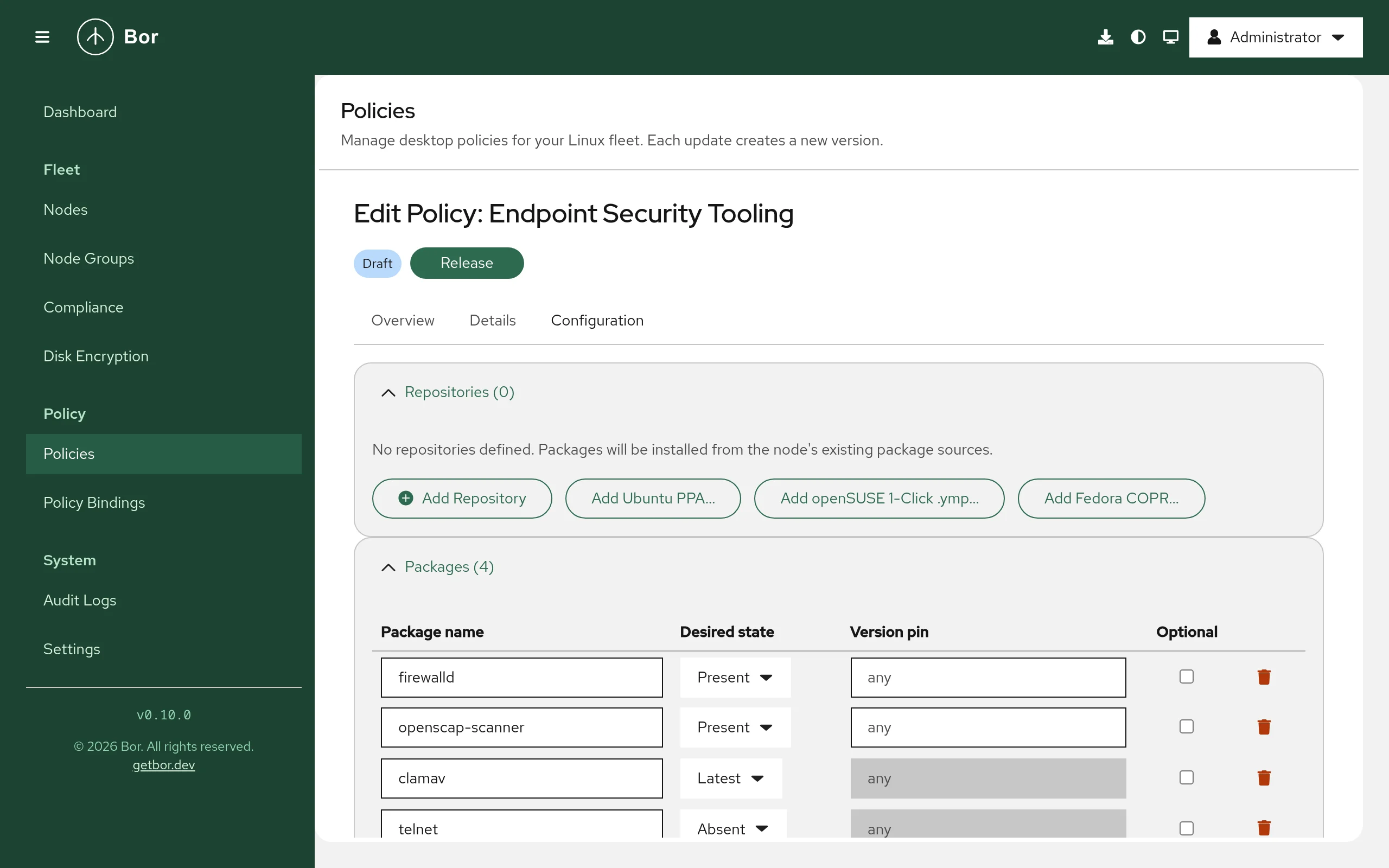
- Open Policies, click Create a policy and choose Package.
- Add repositories and packages. The policy needs at least one of either.
- Set the options, save, Release, and bind the policy to node groups (see Policies and Bindings).
Repositories
Click Add Repository for a manual entry, or use one of the importers described below. Each repository has:
| Field | Applies to | Description |
|---|---|---|
| ID | all | Unique within the policy; used in the file name bor-<id>. Lowercase letters, digits, _ and -; must start with a letter or digit. |
| Name | all | Human-readable label (written as name= for DNF/Zypper). |
| Type | all | APT (deb822), DNF / YUM or Zypper. |
| Enabled | all | When off, the file is kept but the repository is disabled (Enabled: no or enabled=0), so it is easy to re-enable. |
| URI, Suites, Components, Architectures | APT | URI, distribution suite (for example bookworm or noble), components (for example main), optional space-separated architectures (for example amd64 arm64; empty = all). |
| Base URL, Mirror list, Metadata expire (s) | DNF | Exactly one of base URL or mirror list. Metadata expiry in seconds (empty uses the default). |
| Base URL, Priority | Zypper | Base URL; priority 1 (highest) to 99 (lowest), default 99. |
| GPG check | all | Require signature verification. Requires a GPG key. Turning it off is permanently reported as non-compliant. |
| GPG key file | all | Binary or ASCII-armored public key (.gpg, .asc, .key). For DNF/Zypper it is referenced as gpgkey=file:///etc/pki/rpm-gpg/bor-<id>.gpg; for APT as Signed-By:. |
The schema also has a gpgKeyId field for the 40-character key fingerprint.
The server checks its format only; the agent does not compare it with the
key.
Import an Ubuntu PPA
- Click Add Ubuntu PPA....
- Enter the PPA address as
ppa:owner/nameand pick the Ubuntu codename (or a custom one). - Click Add PPA.
The Bor server looks up the PPA's signing key fingerprint on
api.launchpad.net, downloads the key from keyserver.ubuntu.com and
converts it to binary form. The result is an APT repository with URI
https://ppa.launchpadcontent.net/<owner>/<name>/ubuntu, the selected
suite, component main, the key attached and GPG check on. If the key
cannot be fetched, the entry is added without it and a warning is shown;
attach a key before relying on it.
Import a Fedora COPR project
- Click Add Fedora COPR....
- Enter the COPR address as
copr:owner/projector@group/projectand select a Chroot such asfedora-42-x86_64orepel-10-x86_64(or enter a custom one). - Click Add.
The server queries the COPR API on copr.fedorainfracloud.org for the
repository URL of that chroot and downloads the project's pubkey.gpg from
download.copr.fedorainfracloud.org. The result is a DNF repository with
that base URL and the key attached (GPG check on). If the project publishes
no key, a warning is shown and GPG check is off.
Import an openSUSE 1-Click .ymp file
- Click Add openSUSE 1-Click .ymp... and choose the
.ympfile (up to 1 MiB). - If the file contains several distribution versions, a dialog opens: choose the one that matches your nodes and click Import selected. A file with a single version is imported directly. Packages that are already in the policy are skipped.
The file is parsed on the server. Its repositories become Zypper entries and
its packages become package entries. .ymp files carry no signing keys, so
imported repositories have GPG check off; add the key and turn GPG check
on to make them compliant.
All three importers require only policy:view and are made from the Bor
server, so the server needs outbound HTTPS to those hosts. Redirects are
followed only to the listed hosts.
Packages
Click Add Package and set:
- Package name - as known to the node's package database, for example
google-chrome-stableorvim. - Desired state - Present (install if not present), Absent (remove if installed) or Latest (install or upgrade to latest).
- Version pin - only with Present. The agent does not install a specific version; it reports non-compliance when the installed version differs from the pin.
- Optional - a package not found in any enabled repository is reported as inapplicable instead of non-compliant. Useful when one policy targets several distributions.
Options
- Refresh package cache - Refresh repository metadata after writing repo files (equivalent to apt-get update). On by default.
- Allow downgrade - Allow downgrading packages when installing a pinned version.
Setting reference
Policy content is the PackagePolicy message as JSON (camelCase, enums as
strings).
| Field | Description |
|---|---|
repositories[] |
id, name, type (REPOSITORY_TYPE_APT_DEB822, REPOSITORY_TYPE_DNF, REPOSITORY_TYPE_ZYPPER), enabled, aptUri, aptSuites, aptComponents, aptArchitectures, baseurl, mirrorlist, metadataExpire, zypperPriority, gpgCheck, gpgKeyId, gpgKeyData (base64) |
packages[] |
name, state (PACKAGE_STATE_PRESENT, PACKAGE_STATE_ABSENT, PACKAGE_STATE_LATEST), version, optional |
updateCache |
Refresh PackageKit metadata after writing repositories. |
allowDowngrade |
Allow PackageKit to downgrade. |
Server-side validation rejects duplicate repository IDs or package names, a
DNF entry with both or neither of base URL and mirror list, gpgCheck
without gpgKeyData, and a version pin with a state other than Present.
Example: vendor repository on Debian/Ubuntu nodes
{
  "repositories": [
    {
      "id": "google-chrome",
      "name": "Google Chrome",
      "type": "REPOSITORY_TYPE_APT_DEB822",
      "enabled": true,
      "aptUri": "https://dl.google.com/linux/chrome/deb/",
      "aptSuites": "stable",
      "aptComponents": "main",
      "aptArchitectures": "amd64",
      "gpgCheck": true,
      "gpgKeyData": "<base64 of the binary key>"
    }
  ],
  "packages": [
    { "name": "google-chrome-stable", "state": "PACKAGE_STATE_LATEST" }
  ],
  "updateCache": true
}
The agent writes /etc/apt/sources.list.d/bor-google-chrome.sources:
# This file is managed by Bor. Do not edit manually.
# Generated: 2026-10-15T08:00:00Z

Types: deb
URIs: https://dl.google.com/linux/chrome/deb/
Suites: stable
Components: main
Architectures: amd64
Enabled: yes
Signed-By: /etc/apt/trusted.gpg.d/bor-google-chrome.gpg
Example: internal repository on Fedora/RHEL nodes
{
  "repositories": [
    {
      "id": "corp-tools",
      "name": "Corporate tools",
      "type": "REPOSITORY_TYPE_DNF",
      "enabled": true,
      "baseurl": "https://repo.example.com/$releasever/$basearch",
      "gpgCheck": true,
      "gpgKeyData": "<base64 of the key>",
      "metadataExpire": 3600
    }
  ],
  "packages": [
    { "name": "corp-vpn-client", "state": "PACKAGE_STATE_PRESENT" }
  ]
}
Example: remove unwanted packages everywhere
{
  "packages": [
    { "name": "telnet", "state": "PACKAGE_STATE_ABSENT" },
    { "name": "gnome-mines", "state": "PACKAGE_STATE_ABSENT", "optional": true }
  ]
}
A policy without repositories works on every supported distribution.
Merge behavior
All Package policies bound to a node are sorted by binding priority and merged:
- Repositories are deduplicated by ID; the entry from the higher-priority policy wins.
- Packages are deduplicated by name; the higher-priority entry wins for state, version and optional (so a higher-priority Absent overrides a lower-priority Present).
- Refresh package cache and Allow downgrade are taken from the highest-priority policy.
Compliance
The agent reports one item per repository and package. A repository is compliant when its file on disk matches what the policy renders. The policy status rolls up the items: any error makes it Error, any non-compliant item makes it Non-compliant, and only inapplicable items make it Inapplicable. See Compliance.
| Message | Meaning |
|---|---|
GPG verification is disabled for this repository (security risk) |
Persistent reminder while GPG check is off. |
repo file content does not match policy |
The file was changed and not yet restored. |
package "x" not found in any enabled repository |
Non-compliant, or inapplicable when Optional. |
version mismatch: expected A, installed B |
Version pin not met. |
PackageKit RefreshCache failed: ... |
Metadata refresh failed (network, repository, key). |
removal requested but package still detected as installed |
PackageKit reported success but the package remains. |
Tamper protection
The bor-* files in /etc/apt/sources.list.d, /etc/apt/trusted.gpg.d,
/etc/yum.repos.d, /etc/zypp/repos.d and /etc/pki/rpm-gpg are watched.
If one is edited or deleted, the agent re-runs the package sync to restore
it and records a tamper_detected event in the
audit log.
The bor- prefix is reserved
The agent treats every file starting with bor- in those directories as
its own and deletes the ones no policy asks for. Do not name your own
repository or key files bor-*.
Unbind and delete
When a repository is no longer in any bound policy, its bor-<id> file and
key are deleted on the next sync. When no Package policy applies any more,
all bor-* repository and key files are removed.
Installed packages are not removed when a policy is unbound or deleted. To remove software, release a policy with Absent entries first.
Verify on the endpoint
# Managed repository and key files
ls -l /etc/apt/sources.list.d/bor-* /etc/apt/trusted.gpg.d/bor-* 2>/dev/null
ls -l /etc/yum.repos.d/bor-* /etc/zypp/repos.d/bor-* /etc/pki/rpm-gpg/bor-* 2>/dev/null

# Package state, using PackageKit's CLI
pkcon resolve google-chrome-stable

# Or the native tools
apt policy google-chrome-stable       # Debian / Ubuntu
dnf repolist; rpm -q corp-vpn-client  # Fedora / RHEL
zypper repos; rpm -q vim              # openSUSE

# Agent log
sudo journalctl -u bor-agent | grep -i "package"
After each sync the agent logs
Package policies synced (N policies, N repos, N packages).
Troubleshooting
| Symptom | Cause and fix |
|---|---|
Inapplicable: PackageKit service not available on this node |
Install PackageKit (see above). |
no supported package manager detected on this node |
The node has none of apt, dnf/yum, zypper. |
failed to render repo file: baseurl or mirrorlist is required (or apt_uri is required) |
A repository entry of another distribution family reached this node. Split the policy by family. |
| Package not found right after adding its repository | Keep Refresh package cache on so the new repository's metadata is downloaded first. Check that the repository's key is correct. |
| Install fails with a signature or trust error | The repository's key is missing or wrong. The agent only installs trusted packages. |
| A package keeps flipping between versions | Two policies disagree; check binding priorities. |
| PPA or COPR import shows a warning | The key could not be fetched. Retry later or attach the key manually. |
Security considerations
- Always supply the repository's GPG key and keep GPG check on. Keys are
scoped per repository (
Signed-By:for APT,gpgkey=for DNF/Zypper). - Packages run maintainer scripts as root. Only add repositories you trust.
- Prefer Present over Latest for software where unplanned upgrades are a risk; use Latest for security-sensitive software such as browsers.
- The PPA, COPR and
.ymphelpers run on the Bor server and contact only fixed hosts (api.launchpad.net,keyserver.ubuntu.com,copr.fedorainfracloud.org,download.copr.fedorainfracloud.org); user input is validated before it is placed in a URL.