Firefox
The Firefox policy type manages Mozilla Firefox through its built-in
enterprise policy engine. Bor writes a policies.json file that Firefox
reads at startup, so the settings apply to every profile and every user on
the node and cannot be changed from the browser preferences. This page
covers what the type controls, the files the agent writes, how to build a
policy in the web UI, how several Firefox policies are combined and how to
verify the result on a desktop.
What it controls
The Firefox schema covers the enterprise policies most organizations need, grouped in the editor as follows:
| Group | Examples of settings |
|---|---|
| Updates | Disable App Update, App Auto Update, App Update Pin |
| Privacy & Telemetry | Disable Telemetry, Disable Firefox Studies, Disable Pocket, Disable Firefox Accounts, Disable Form History |
| Security | Password Manager Enabled, Offer To Save Logins, Disable Password Reveal, Disable Security Bypass, SSLVersion Min / SSLVersion Max |
| Restrictions | Block About Config, Block About Addons, Block About Profiles, Block About Support, Disable Safe Mode, Disable Profile Import |
| General | Dont Check Default Browser, Default Download Directory, Prompt For Download Location, No Default Bookmarks, first-run and post-update pages |
| Homepage & New Tab | Homepage (URL, lock, additional pages, start page), Firefox Home sections, New Tab Page |
| Tracking Protection | Enable Tracking Protection with cryptomining, fingerprinting and email-tracking options and exceptions |
| Cookies & Popups | Cookies (allow, block and session lists, behavior), Popup Blocking |
| Network | Proxy, DNSOver HTTPS, Network Prediction, Captive Portal |
| Extensions | Extensions (install, uninstall and locked lists) |
| Bookmarks, Permissions, Appearance | Managed bookmarks, camera/microphone/location/notification/autoplay permissions, toolbar and menu bar visibility, desktop background |
Each setting maps one to one to the Firefox policy of the same name (the
editor labels split the policy name into words, so DisableTelemetry
appears as Disable Telemetry). Mozilla's policy documentation explains
the exact effect of each policy.
The server validates some values before saving: SSLVersion Min and
SSLVersion Max must be one of tls1, tls1.1, tls1.2, tls1.3;
the homepage Start Page must be none, homepage,
previous-session or homepage-locked; the proxy Mode must be
none, system, manual, autoDetect or autoConfig; the homepage URL
and the
DNS-over-HTTPS provider URL must be http or https URLs.
Files on the endpoint
| Installation | File | Agent config key |
|---|---|---|
| Distribution package | /etc/firefox/policies/policies.json |
firefox.policies_path |
Flatpak (org.mozilla.firefox) |
/var/lib/flatpak/extension/org.mozilla.firefox.systemconfig/<arch>/stable/policies/policies.json |
firefox.flatpak_policies_path |
<arch> is x86_64 on amd64 nodes and aarch64 on arm64 nodes. The
Flatpak path is the system-config extension point that the Firefox Flatpak
reads its policies from.
The written file looks like this:
{
  "_comment": "This file is managed by Bor. Do not edit manually. Changes will be overwritten by policy enforcement.",
  "policies": {
    "DisableTelemetry": true
  }
}
Firefox ignores the _comment key; it marks the file as Bor-managed for
anyone who opens it. Files are written atomically (temporary file plus
rename) with mode 0644, and missing directories are created.
Backup of an existing file. Before the first write to the system path,
the agent copies any existing policies.json to
policies.json.bor-backup (or creates an empty marker if there was no
file). When the last Firefox policy is removed from the node, the original
is restored, or the file is deleted if there was none. The Flatpak copy is
owned entirely by Bor and is simply deleted.
To change or disable a path, set the key in /etc/bor/config.yaml and
restart the agent. An empty value disables the Flatpak copy:
Note
The agent writes both files even when Firefox is not installed (the Flatpak write is best effort; a failure there is only logged). This keeps the policy ready if the browser is installed later.
Create a Firefox policy
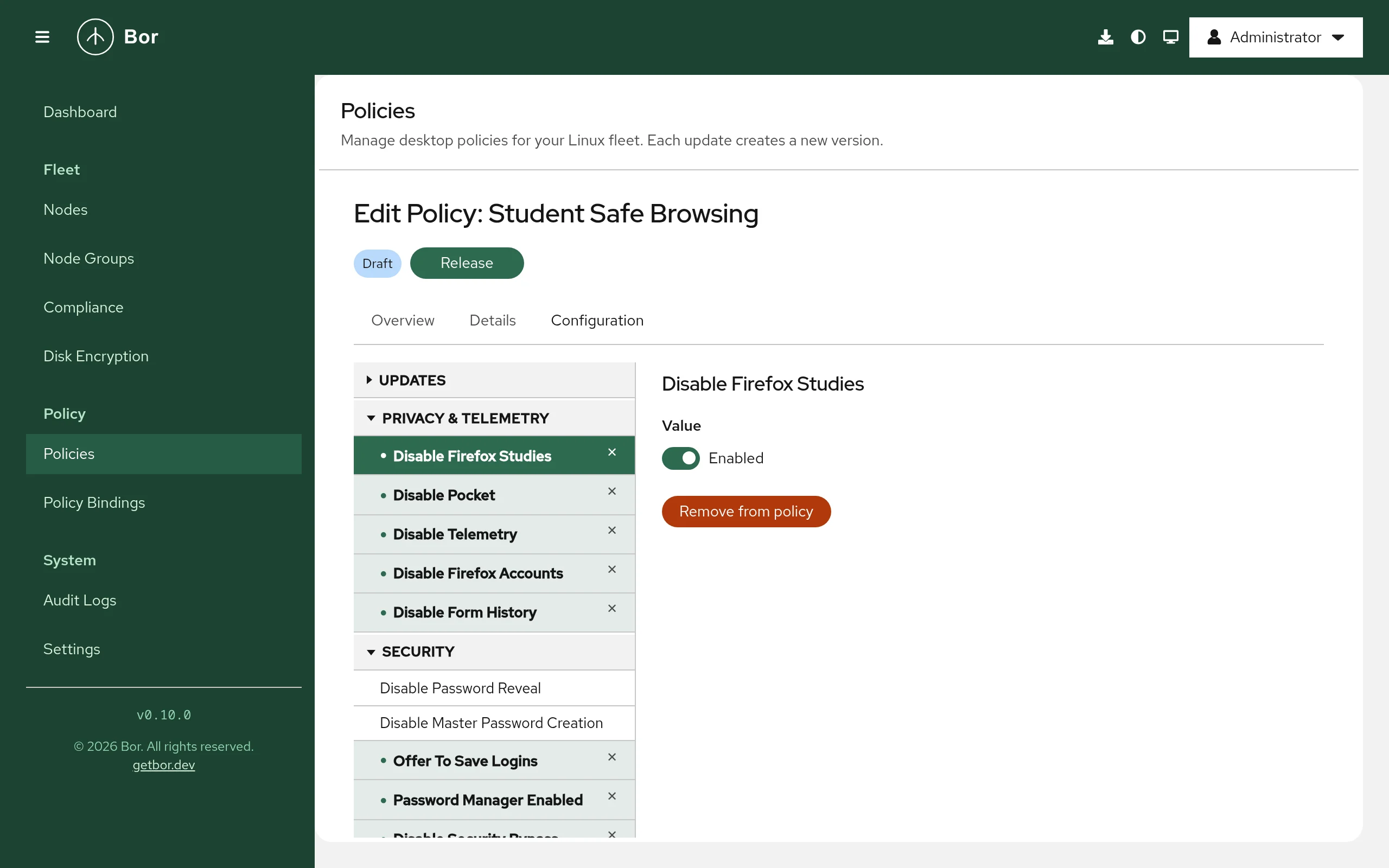
- Go to Policies and click Create a policy.
- On the Type step pick Firefox, then click Next.
- On the Details step enter a Name and optionally a Description.
- On the Configuration step use the settings tree on the left. Expand a group and click a setting to preview it on the right. The setting becomes part of the policy when you change its value or click Add to policy. Click Remove from policy to drop it again. Configured settings are highlighted in the tree.
- Check the summary on the Review step and create the policy.
- Release the policy (the wizard offers this right away) and bind it to a node group on Policy Bindings. See policies and bindings.
The value editor depends on the setting:
- On/off settings show a switch (Enabled / Disabled).
- Settings with a fixed set of values show a drop-down list.
- List settings show a text area with one item per line.
- Composite settings such as Homepage, Proxy or Extensions show one field per sub-setting; boolean sub-settings show a Yes / No switch and lists again take one item per line.
At least one setting must be configured before the policy can be saved.
Examples
Set and lock the home page
Group Homepage & New Tab, setting Homepage:
| Field | Value |
|---|---|
| URL | https://intranet.example.com/ |
| Locked | Yes |
| Start Page | homepage |
Resulting policies.json fragment:
Users see the intranet page on startup and the home page preference is greyed out.
Disable telemetry and studies
Group Privacy & Telemetry: set Disable Telemetry and Disable Firefox Studies to Enabled.
Force-install and lock an extension
Group Extensions, setting Extensions:
| Field | Value (one per line) |
|---|---|
| Install | https://addons.mozilla.org/firefox/downloads/latest/ublock-origin/latest.xpi |
| Locked | uBlock0@raymondhill.net |
Install takes download URLs or local paths of .xpi files;
Locked takes extension IDs that users must not disable or remove;
Uninstall takes extension IDs to remove.
How multiple Firefox policies are merged
All Firefox policies that apply to a node are merged into a single
policies.json:
- Settings that only one policy sets are taken as they are.
- Composite settings (for example Homepage or Proxy) are merged field by field.
- Lists are concatenated, so two policies that each install an extension result in both extensions being installed. A value listed by both policies appears twice.
- When two policies set the same single value differently, the result is not defined: binding priority is not taken into account for Firefox.
- A sub-setting that is off or empty in one policy does not switch off the same sub-setting turned on in another policy.
Keep each setting in exactly one policy. See merging and conflicts.
What users see
Firefox reads policies.json only at startup. After a change the agent can
show a desktop notification asking users to restart Firefox (configured
under Settings -> Agent Notifications).
In Firefox, open about:policies:
- The Active Policies tab lists every policy Firefox applied with its value.
- The Errors tab lists policies Firefox could not apply, for example a policy that the installed Firefox version does not know.
Locked preferences appear greyed out in the settings pages, and Firefox shows "Your browser is being managed by your organization" in the menu and preferences.
Verify on the node
# Show the file the agent wrote
sudo cat /etc/firefox/policies/policies.json

# Check that it is valid JSON
python3 -m json.tool /etc/firefox/policies/policies.json > /dev/null && echo OK

# Follow the agent log while you release or bind the policy
sudo journalctl -u bor-agent -f | grep -i firefox
A successful sync logs a line such as
Firefox policies synced to /etc/firefox/policies/policies.json (1 policies).
In the web UI the policy is reported Compliant with the message
Deployed on the compliance page.
Troubleshooting
The policy is compliant but Firefox ignores it. Compliance for this type only confirms that the file was written. Check:
- Firefox was restarted after the change.
about:policiesshows the policy, or lists it on the Errors tab. Older Firefox versions do not know newer policies; Firefox ESR is the recommended channel for managed desktops.- Your Firefox build actually reads
/etc/firefox/policies/. Some builds read policies from their installation directory instead; in that case pointfirefox.policies_pathto the location your build uses. - For the Flatpak, the file exists under
/var/lib/flatpak/extension/org.mozilla.firefox.systemconfig/.
Users changed policies.json and the change disappeared. That is tamper
protection: the agent restores the file and records a tamper_detected
event in the audit log.
Two policies fight over a value. See the merge rules above: move the setting into one policy or put the policies on disjoint node groups.
The policy is reported non-compliant with "failed to sync Firefox
policies". The message contains the underlying error, usually a file
system problem (read-only /etc, full disk, SELinux denial). Check the
agent log with sudo journalctl -u bor-agent.