Dconf (GNOME and GSettings)
The Dconf policy type enforces GSettings keys as system-wide settings through dconf, the configuration store behind GNOME and many other GSettings-based applications. Each entry sets one key, and can optionally lock it so users cannot change it. This page covers the files the agent writes, how to pick keys in the editor, value formats, priority-based merging, compliance and verification on a GNOME desktop.
What it controls
Any GSettings key in any schema: GNOME Shell, the GNOME desktop
(org.gnome.desktop.*), Nautilus, GNOME applications, and third-party
software that stores its configuration in GSettings. Typical uses:
- Screen lock and idle behavior (
org.gnome.desktop.screensaver,org.gnome.desktop.session). - Lockdown keys (
org.gnome.desktop.lockdown), for example disabling user switching or the command line. - Removable media handling (
org.gnome.desktop.media-handling). - Default favorites, backgrounds, themes and fonts.
A policy is a list of entries plus an optional database name:
| Field | Meaning |
|---|---|
| Schema | GSettings schema ID, for example org.gnome.desktop.screensaver |
| Key | Key name in the schema, for example lock-enabled |
| Value | Value in GVariant text format, for example true, 'Adwaita' or uint32 300 |
| Lock (Prevent override) | Adds the key to the locks file so users cannot change it |
| dconf path override | Only for relocatable schemas: the dconf path to write to |
| dconf database name | System database to write to; default local |
Files on the endpoint
For database local (the default) the agent writes:
| File | Content |
|---|---|
/etc/dconf/db/local.d/00-bor |
Keyfile with all values, one [section] per schema path |
/etc/dconf/db/local.d/locks/bor |
One locked key path per line |
/etc/dconf/profile/user |
Must contain system-db:local; the agent appends the line if it is missing, or creates the file with user-db:user and system-db:local |
After writing, the agent runs dconf update to compile the database.
Running sessions pick up the new values without logging out.
Before the first write the agent keeps a .bor-backup copy of any existing
00-bor or locks/bor file. Both managed files are tamper-protected.
The database name may contain only letters, digits, ., _ and -. A
different name writes to /etc/dconf/db/<name>.d/ and adds
system-db:<name> to the user profile instead.
Schema catalogue
The editor offers schemas from a catalogue on the server. It starts
with a built-in set of common schemas and grows as agents report the
schemas installed on their nodes (they scan
/usr/share/glib-2.0/schemas when the agent starts). Schemas
installed on a node later only appear after the agent restarts.
Create a Dconf policy
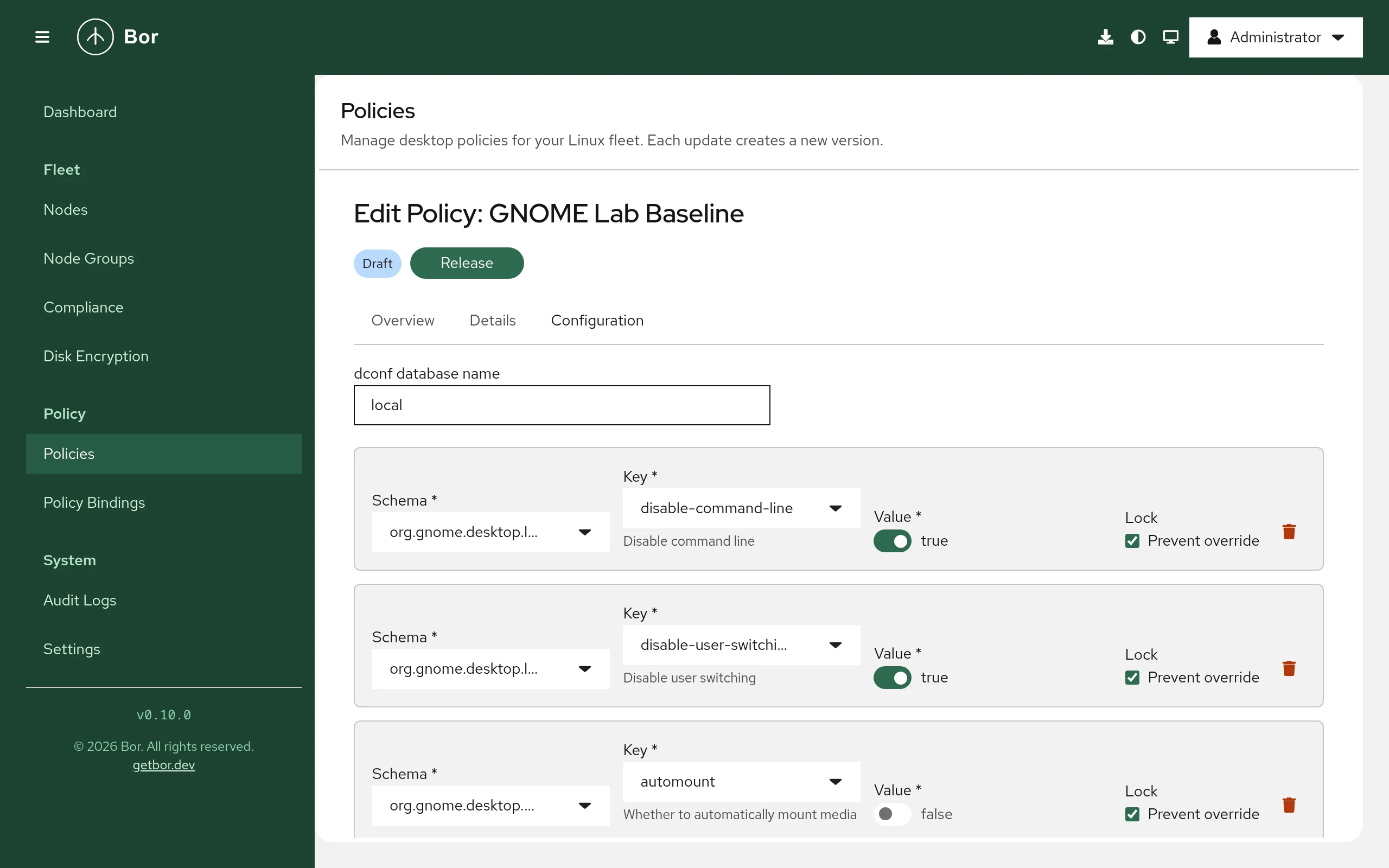
- Go to Policies, click Create a policy and pick Dconf on the Type step. Enter a Name on the Details step.
- On the Configuration step, leave dconf database name empty or at
localunless your systems use another system database. - Click Add entry for each key and fill in the row:
- Schema: searchable list of schemas; the description shows the schema's dconf path, or (relocatable).
- Key: searchable list of the schema's keys, with the key summary shown below the field.
- Value: an input that matches the key type: a switch for booleans, a drop-down for enum keys and keys with fixed choices, a number field for integers and doubles, a text field for string arrays and a plain text field for everything else. New entries start with the schema's default value.
- Lock: tick Prevent override to lock the key.
- For relocatable schemas, enter a dconf path override that starts
and ends with
/.
- Review, create and release the policy, then bind it to a node group.
GVariant value format
The editor formats values for you. If you import or edit policy JSON directly, use GVariant text format:
| Key type | Example | Notes |
|---|---|---|
b (boolean) |
true |
|
i (int32) |
5 |
No prefix |
u (uint32) |
uint32 300 |
Prefix required |
q (uint16) |
uint16 5042 |
Prefix required |
d (double) |
1.5 |
|
s (string) |
'Adwaita' |
Single quotes required |
as (string array) |
['firefox.desktop', 'org.gnome.Nautilus.desktop'] |
Warning
A bare number for an unsigned or 16-bit key (for example 300 for a
uint32 key) is ignored by dconf. Always include the type prefix.
Examples
Lock the screen after five minutes of inactivity
| Schema | Key | Value | Lock |
|---|---|---|---|
org.gnome.desktop.session |
idle-delay |
uint32 300 |
Prevent override |
org.gnome.desktop.screensaver |
lock-enabled |
true |
Prevent override |
org.gnome.desktop.screensaver |
lock-delay |
uint32 0 |
Prevent override |
The agent writes /etc/dconf/db/local.d/00-bor:
# This file is managed by Bor. Do not edit manually.
# Changes will be overwritten by policy enforcement.

[org/gnome/desktop/session]
idle-delay=uint32 300

[org/gnome/desktop/screensaver]
lock-enabled=true
lock-delay=uint32 0
and /etc/dconf/db/local.d/locks/bor:
/org/gnome/desktop/session/idle-delay
/org/gnome/desktop/screensaver/lock-enabled
/org/gnome/desktop/screensaver/lock-delay
Disable user switching (lockdown)
To find the right key, open the Schema list and search for
lockdown. Pick org.gnome.desktop.lockdown, then search the Key list
for switching; the summary under the field describes the key.
| Schema | Key | Value | Lock |
|---|---|---|---|
org.gnome.desktop.lockdown |
disable-user-switching |
true |
Prevent override |
Turn off automounting, but let users turn it back on
| Schema | Key | Value | Lock |
|---|---|---|---|
org.gnome.desktop.media-handling |
automount |
false |
(not locked) |
Without a lock the value is a system default: it applies to every user who has not changed the setting, and users can still change it.
How multiple Dconf policies are merged
Dconf is one of the types where binding priority matters:
- Entries are merged by schema, path and key. If several policies set the same key, the policy with the higher binding priority wins. With equal priorities the winner is not defined.
- All entries go into one database. If several policies set a database name, the name from the highest-priority policy that sets one is used.
- In the compliance report, the losing policy shows the overridden key as Inapplicable with the message "Overridden by a higher-priority policy; applied value: ..." so it does not count against the node.
See bindings for setting priorities.
Compliance
After dconf update the agent reads every key back with
gsettings get <schema> <key> and compares it with the policy value
(integer type prefixes are ignored in the comparison). Each key gets its
own result, visible in the expandable row on the
compliance page:
| Result | Meaning |
|---|---|
| Compliant | The current value matches the policy. |
| Non-compliant | The value differs; the details show the expected and actual value. |
| Inapplicable | The schema is not installed on the node (for example a GNOME policy on a KDE node), or another policy with higher priority sets the key. |
| Error | The schema is installed, but writing the files, dconf update or gsettings get failed. |
The policy's overall status is Inapplicable only when every key is inapplicable; otherwise any error makes it Error, and any mismatch makes it Non-compliant.
What users see
- Locked settings are greyed out or have no effect in GNOME Settings and
other applications;
gsettings seton a locked key fails with a "key is not writable" error. - Unlocked values act as new defaults. Users who already changed the key keep their own value.
- Flatpak applications with current runtimes receive host values for
org.gnome.desktop.*keys through the settings portal; application schemas inside a sandbox are not covered.
Verify on the node
# Files and profile
sudo cat /etc/dconf/db/local.d/00-bor
sudo cat /etc/dconf/db/local.d/locks/bor
cat /etc/dconf/profile/user

# Run as the desktop user:
gsettings get org.gnome.desktop.session idle-delay
gsettings writable org.gnome.desktop.session idle-delay   # "false" when locked
dconf read /org/gnome/desktop/session/idle-delay
The agent log shows dconf policies synced (db=local, N policies) after
each sync:
Troubleshooting
Error "dconf update failed". The dconf command is missing or failed;
the compliance message includes its output. Install the dconf package
(on most GNOME systems it is already present).
Error "dconf: invalid db name". The database name contains characters
other than letters, digits, ., _ and -.
The value is written but sessions do not use it. Check that
/etc/dconf/profile/user contains the system-db: line for the database
you use. If your systems set the DCONF_PROFILE environment variable or
use a different profile file, add the database there as well.
Non-compliant although the keyfile is correct. The user (or the root
account the agent runs gsettings as) may have a personal value that
overrides an unlocked key. Lock the key, or accept that unlocked keys are
defaults only.
Non-compliant or error for a relocatable schema. Compliance checks read
the key with gsettings get <schema> <key>, which cannot address a
relocatable schema without a path. Verify such keys manually with
dconf read <path><key>.
The schema is missing from the list. The editor only offers schemas from the catalogue. Install the software that provides the schema on at least one enrolled node and restart its agent so it reports its schemas.
Settings remain after switching the database name. Cleanup only applies
to the database currently in use. If you move policies from a custom
database back to local (or the other way round), remove the old
/etc/dconf/db/<name>.d/00-bor and locks/bor files and run
sudo dconf update.
SELinux denials. On SELinux-enforcing systems, check
sudo ausearch -m avc -ts recent if the agent cannot write to
/etc/dconf/db/.