Audit log
Bor records security-relevant activity as structured audit events: every change made through the web UI or REST API, sign-ins, permission denials, and tampering detected by agents. Events are stored in the database, shown on the Audit Logs page, can be exported, and can be forwarded in real time to a SIEM over syslog. This page explains what is logged, how to search and export the log, and how to configure retention, IP anonymization and syslog forwarding.
Open it from System -> Audit Logs in the sidebar. Viewing the log
requires audit_log:view; exporting it requires audit_log:export.
What is logged
| Category | Recorded when | Typical action / resource type |
|---|---|---|
| Changes | Every successful (2xx) state-changing API request (POST, PUT, PATCH, DELETE): policies, bindings, nodes, node groups, users, roles, user groups, role assignments, settings, Flatpak repositories, Tang servers. |
create, update, delete on policies, nodes, node-groups, users, ... |
| Authentication | Successful and failed sign-ins, logouts, MFA enrollment and removal, re-authentication for privileged actions. | auth.login, auth.logout, auth.mfa.enroll, auth.mfa.disable, ... |
| Authorization | A request refused because the user lacks a permission, including privilege-escalation attempts. | access_denied |
| Role removals | Role assignments removed. | revoke_role |
| Tampering | An agent detected and reverted a local change to a file it manages. The event names the node, the file and the processes that held the file. | tamper_detected on managed_file |
| Policy transfer | Policy export and completed policy import. | policy.export, policy.import |
| Disk encryption | Recovery key escrow, reveal (and refused reveals), rotation and related events. | recoverykey.*, luks.* |
Each event records the time, the actor (username and user ID, or the node
for agent events), the action, the resource type and ID, the source IP
address and details. For API changes the details hold the request body with
sensitive fields replaced by [REDACTED]: any field whose name contains
password, passwd, secret, token, credential, passphrase,
private_key, api_key, jwt or recovery_key (and similar variants)
is never stored.
Read-only requests (GET) are not logged, except where noted above.
The Audit Logs page
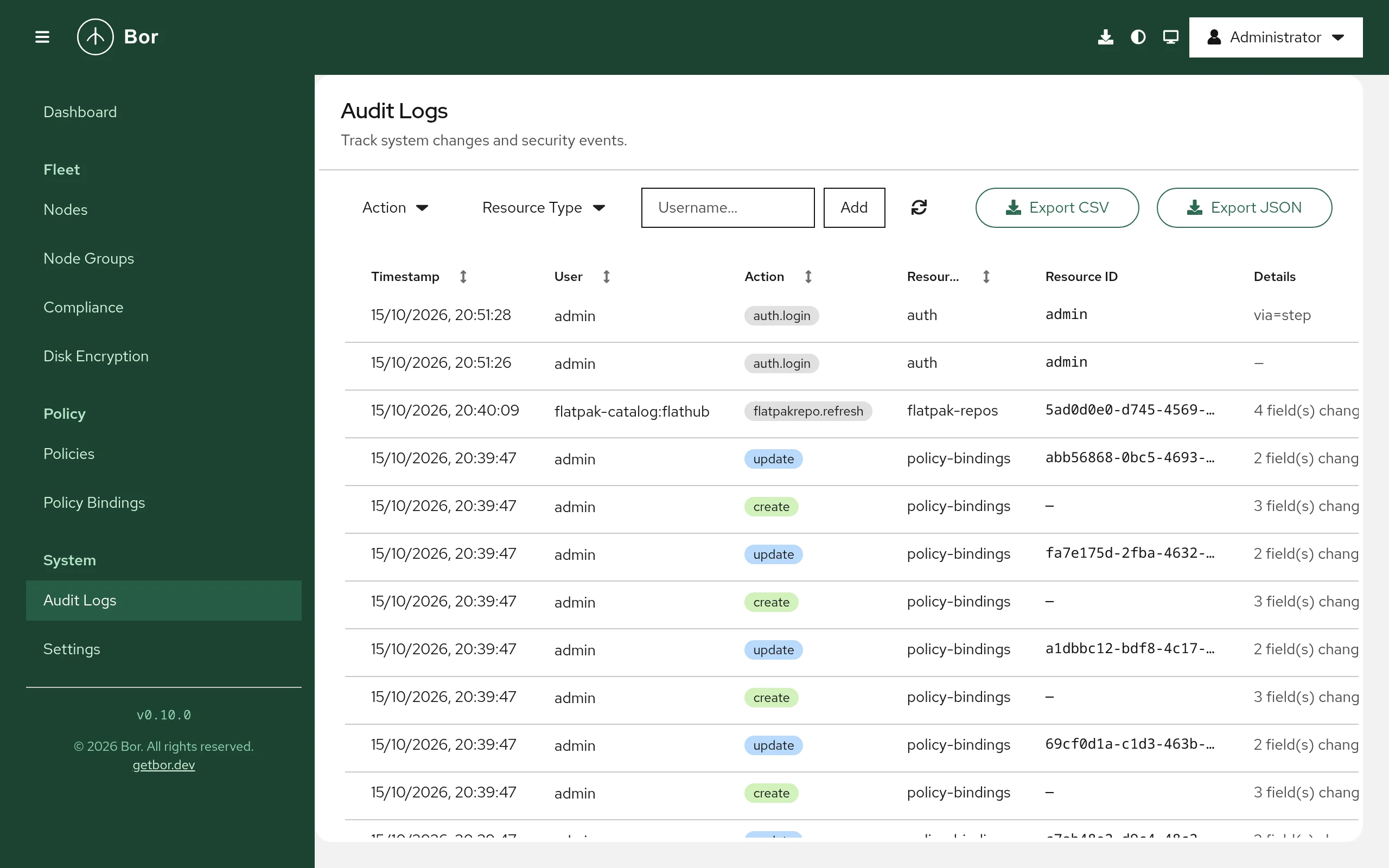
The table shows Timestamp, User, Action, Resource Type, Resource ID, Details and IP Address. Timestamp, User, Action and Resource Type can be sorted.
Select a row to open the event details:
- Identity - the User (or Node for tamper events) and IP Address.
- Event - Action, Resource Type, Resource Name and Resource ID.
- For tamper events, Tampered File and Processes at Detection Time.
- Changed Values or Details - the recorded request data.
Filter the log
- Action - add one or more actions, for example
create,delete,access_deniedortamper_detected. - Resource Type - add one or more types, for example
policies,nodes,usersormanaged_file. - Username - type a username and select Add.
Active filters appear as chips; remove one with its close button or use Clear all. The refresh button reloads the list.
Export the log
Select Export CSV or Export JSON to download audit_logs.csv or
audit_logs.json. The export contains all entries that match the active
action, resource type and username filters, not just the current page.
Retention
Audit records older than the retention period are deleted automatically. The purge runs at server start and then once a day.
| Setting | YAML (/etc/bor/server.yaml) |
Environment variable | Default |
|---|---|---|---|
| Retention in days | audit.retention_days |
BOR_AUDIT_RETENTION_DAYS |
365 |
Set it to 0 to keep audit records forever. Choose the value from your
legal and compliance requirements (for example GDPR data minimization on
one side and NIS2 incident-logging duties on the other). Forward events to
a SIEM if you need a longer or tamper-evident archive.
IP anonymization
To reduce the personal data stored in audit records, the server can
truncate client IP addresses before storing them: IPv4 addresses to their
/24 network (for example 192.0.2.0) and IPv6 addresses to their /48
network (for example 2001:db8:1::).
This setting is available only as an environment variable:
Restart the server after changing it (sudo systemctl restart
bor-server). It affects new records only. Note that IP addresses are taken
from X-Forwarded-For or X-Real-IP when present, so a reverse proxy in
front of Bor must set those headers for the logged address to be the
client's.
Forward to a SIEM over syslog
The server can send every audit event, as it happens, to a syslog
receiver. Messages use RFC 5424 framing with the application name Bor,
and the body in one of two formats:
| Format | Standard | Typical receivers |
|---|---|---|
cef |
ArcSight Common Event Format (vendor Vute Tech, product Bor) |
IBM QRadar, ArcSight, Splunk with a CEF add-on, most SIEMs |
ocsf |
Open Cybersecurity Schema Framework 1.3.0, as JSON | Microsoft Sentinel, Splunk OCSF, AWS Security Lake |
In OCSF, API changes use class API Activity (6003), user account changes
use Account Change (3002) and tamper events use File System Activity
(1001).
Configuration
YAML key (under audit.syslog) |
Environment variable | Default | Meaning |
|---|---|---|---|
enabled |
BOR_AUDIT_SYSLOG_ENABLED |
false |
Turn forwarding on. |
network |
BOR_AUDIT_SYSLOG_NETWORK |
udp |
udp, tcp or tcp+tls. |
addr |
BOR_AUDIT_SYSLOG_ADDR |
localhost:514 |
Receiver host:port. |
format |
BOR_AUDIT_SYSLOG_FORMAT |
cef |
cef or ocsf. |
facility |
BOR_AUDIT_SYSLOG_FACILITY |
16 |
Syslog facility 0-23 (16 is local0). |
tls_ca |
BOR_AUDIT_SYSLOG_TLS_CA |
empty | PEM CA file used to verify the receiver for tcp+tls. Empty means the system trust store. |
Example:
audit:
  syslog:
    enabled: true
    network: "tcp+tls"
    addr: "siem.example.com:6514"
    format: "ocsf"
    facility: 16
    tls_ca: "/etc/bor/siem-ca.pem"
Restart the server after changing the configuration. The log shows Audit
syslog sink enabled with the transport, address and format.
Transport notes:
udphas no delivery guarantee. Use it only on trusted networks.tcpreconnects and retries once if a write fails.tcp+tlsistcpwith TLS 1.2 or later and server certificate verification. Use it whenever events cross an untrusted network.
Events are queued in memory (512 events) and sent asynchronously, so a slow receiver never delays the web UI. If the queue is full or delivery fails after the retry, the event is dropped from the syslog stream and a warning is written to the server log; the database copy is not affected.
Verify forwarding
- Make a harmless change in the web UI, for example edit the description of a node group.
-
Check that your receiver got a line similar to:
With
ocsf, the message body is a JSON object withclass_uid6003. 3. If nothing arrives, checksudo journalctl -u bor-serverforaudit SyslogSinkwarnings and confirm the receiver port is reachable from the server.