Firewall (firewalld)
The Firewall policy type (technical name Firewalld) manages the permanent
ruleset of a firewalld zone on your nodes: allowed services, ports and
protocols, ICMP handling, masquerading, port forwarding, rich rules and the
zone's default target. This page explains what the agent changes on the
endpoint, how to build a policy in the editor, how several policies are merged,
and how to verify and troubleshoot the result.
Zones, not firewalld policy objects
Bor manages firewalld zones. firewalld "policy objects" (rules for traffic between zones) are not managed by this policy type.
What it controls
For every zone targeted by at least one bound policy, the agent renders a
complete zone definition into /etc/firewalld/zones/<zone>.xml, validates the
permanent configuration with firewall-cmd --check-config and then runs
firewall-cmd --reload to make it active.
The generated file replaces the zone's ruleset with the merged ruleset from Bor. Some parts of an existing zone file are preserved because they are host-specific:
| Preserved from the existing zone file | Replaced by Bor |
|---|---|
<short> and <description> labels |
Zone target |
<interface name="..."> bindings |
Services, ports, source ports, protocols |
<source address/mac/ipset="..."> bindings |
ICMP blocks and ICMP block inversion |
| Masquerade, forward ports, rich rules |
This means you can keep assigning interfaces and source networks to zones locally (or with NetworkManager), while Bor decides what each zone allows.
Every file Bor writes starts with the comment
<!-- This file is managed by Bor. Do not edit manually. -->.
Endpoint prerequisites
- firewalld must be installed (the
firewall-cmdbinary must be on the agent'sPATH) and thefirewalldservice must be running. - No other packages are needed.
If firewall-cmd is missing, the policy is reported as inapplicable with
the message firewalld is not installed on this node. If firewalld is installed
but stopped, the policy is reported as inapplicable with
firewalld is installed but not running. The agent does not install, enable
or start firewalld for you.
To prepare a node:
Only one firewall manager
Do not run firewalld together with another firewall frontend (for example
ufw on Ubuntu) on the same node. Disable the other frontend first.
Agent configuration
The agent reads one key for this policy type from /etc/bor/config.yaml:
| Key | Default | Description |
|---|---|---|
firewalld.zones_dir |
/etc/firewalld/zones |
Directory where the agent writes managed zone XML files. Only change this if your firewalld uses a non-standard configuration directory. |
Create a firewall policy
- Open Policies and click Create a policy.
- Choose the Firewall tile and enter a name and description.
- Fill in the editor (see below) and save the policy.
- Click Release. Only released policies are delivered to agents.
- Bind the policy to one or more node groups on the bindings page.
See Policies for the general policy lifecycle.
The editor rejects an empty policy: configure at least one setting before saving.
Editor sections
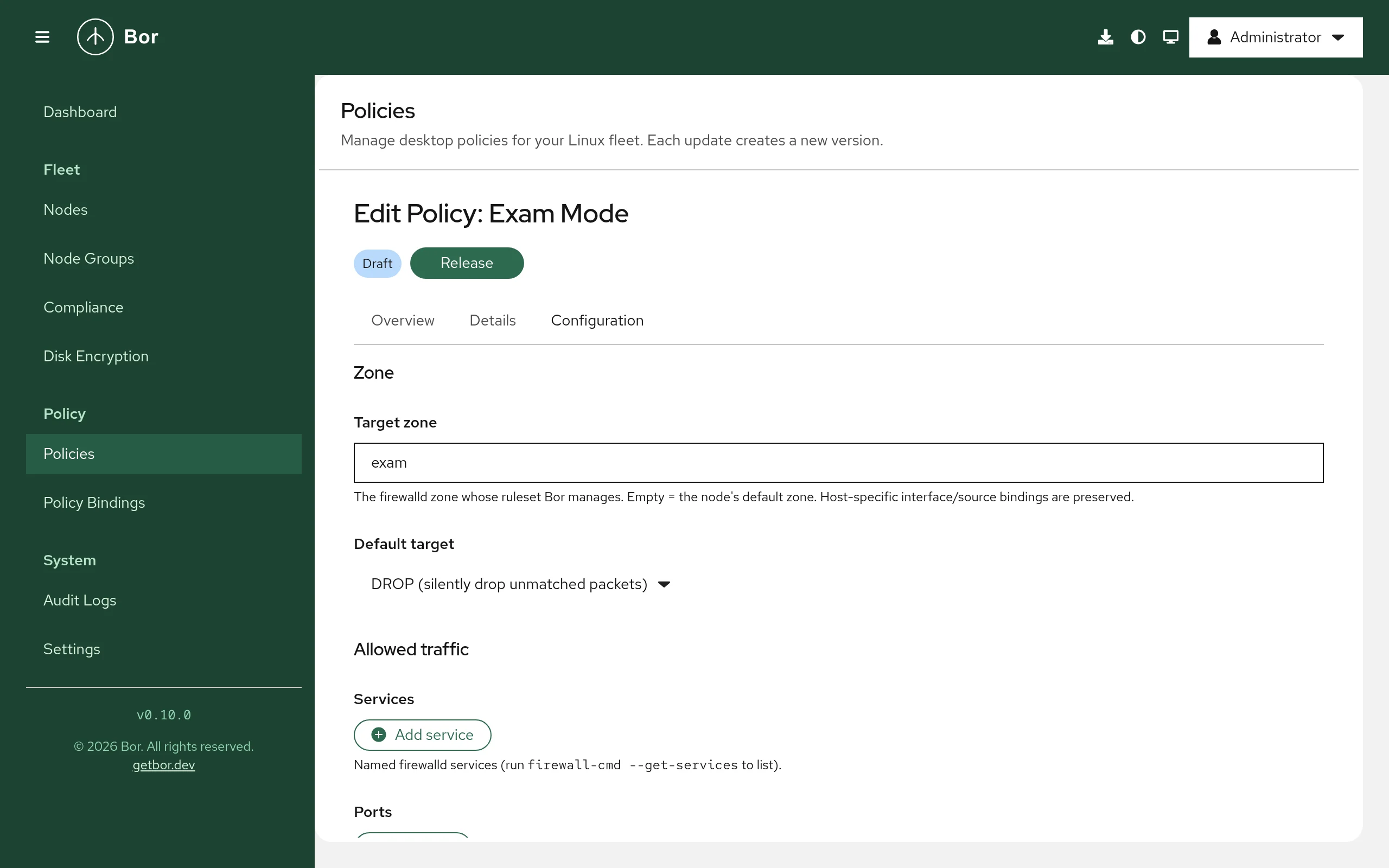
Zone
- Target zone - the firewalld zone whose ruleset Bor manages. Leave it
empty to use the node's default zone (as reported by
firewall-cmd --get-default-zoneon each node). Zone names may contain letters, digits,_and-, and are at most 17 characters long. -
Default target - what happens to packets that match no rule in the zone:
Option Meaning default (firewalld zone default) firewalld's built-in default behavior (no targetattribute is written)ACCEPT (accept unmatched packets) Accept everything not otherwise matched REJECT (reject with ICMP error) Reject unmatched packets with an ICMP error DROP (silently drop unmatched packets) Drop unmatched packets without a reply
Allowed traffic
- Services - named firewalld services such as
ssh,httporhttps. Runfirewall-cmd --get-serviceson a node to list them. - Ports - a port (
443) or range (5000-6000) plus a protocol:tcp,udp,sctpordccp. Ports must be between 1 and 65535. - Protocols - IP protocol names from
/etc/protocols, for examplegre,esporah. - Source ports - allowed source ports, same format as Ports.
ICMP & NAT
- ICMP blocks - ICMP types to block, for example
echo-request. Runfirewall-cmd --get-icmptypesto list them. - ICMP block inversion - when checked (Accept only the listed ICMP types; block all others), the meaning of the list is inverted: only the listed ICMP types are accepted.
- Masquerade (NAT) - Enable IP masquerading for this zone.
Port forwarding
- Forward ports - each entry has a source port or range, a protocol, an optional destination port (to port (optional), defaults to the source port) and an optional destination IP address (to address (optional)) for forwarding to another host.
Rich rules
- Rich rules - firewalld rich-language rules for cases the fields above do
not cover. Each rule must begin with
rule. The agent converts each rule to the zone XML form; rules it cannot parse, and rules that firewalld rejects duringfirewall-cmd --check-config, make the whole policy fail (see Troubleshooting).
Setting reference
Policy content is stored as JSON (the FirewalldPolicy message). Field names
use camelCase.
| Field | Type | Description |
|---|---|---|
zone |
string | Target zone. Empty = node's default zone. |
target |
string | default, ACCEPT, REJECT or DROP. Empty = default. |
services |
list of strings | Allowed services. |
ports |
list of {port, protocol} |
Allowed ports. |
sourcePorts |
list of {port, protocol} |
Allowed source ports. |
protocols |
list of strings | Allowed IP protocols. |
icmpBlocks |
list of strings | ICMP types to block. |
icmpBlockInversion |
boolean | Invert ICMP block handling. |
masquerade |
boolean | Enable masquerading. |
forwardPorts |
list of {port, protocol, toPort, toAddr} |
Port forwards. |
richRules |
list of strings | Raw rich-language rules. |
ensureEnabled |
boolean | Present in the schema but not enforced yet; the agent never starts firewalld. |
Example: SSH and a remote-support port on the default zone
Example: a locked-down office zone
Drop everything that is not explicitly allowed in the work zone, allow
HTTPS and a printer, and block ping:
{
  "zone": "work",
  "target": "DROP",
  "services": ["https", "ipp"],
  "ports": [
    { "port": "9100", "protocol": "tcp" }
  ],
  "icmpBlocks": ["echo-request"]
}
Example: SSH only from a management network
Use a rich rule to restrict a service to a source network:
{
  "zone": "public",
  "richRules": [
    "rule family=\"ipv4\" source address=\"192.0.2.0/24\" service name=\"ssh\" accept"
  ]
}
Merge behavior
When several firewall policies are bound to the same node, the agent groups them by target zone (an empty zone resolves to the node's default zone) and merges each group into one zone file:
- Lists (services, ports, source ports, protocols, ICMP blocks, forward ports, rich rules) are unioned, with duplicates removed.
- Booleans (
masquerade,icmpBlockInversion) are OR-ed: if any policy turns them on, they are on. - Target is taken from the policy with the highest binding priority
that sets a target other than
default.
Because lists are unioned, one policy cannot remove a service that another policy allows. To restrict a zone, make sure no other bound policy allows the traffic.
Policies that target different zones produce separate zone files.
Tamper protection
Every zone file Bor manages is watched by the agent. If someone edits or
deletes it, the agent immediately re-renders the zone, validates, reloads
firewalld and records a tamper_detected event in the
audit log, including the processes that held
the file open when it could identify them.
Runtime-only changes
Tamper protection watches the zone files. A runtime-only change made
with firewall-cmd without --permanent does not touch the file and is
not detected, but it is discarded on the next sync, because every sync
ends with firewall-cmd --reload.
Backups, unbind and delete
Before writing a zone file for the first time, the agent saves the original
as <zone>.xml.bor-backup in the same directory. If no file existed (for
example, the zone was only defined by the distribution in
/usr/lib/firewalld/zones/), an empty backup is written as a marker.
- When a policy no longer targets a zone (it was unbound, deleted, or its zone changed), the agent restores that zone from its backup: the original file is put back, or the managed file is removed if there was no original, so firewalld falls back to the distribution default. The backup is then deleted.
- When no firewall policies apply to the node any more, all managed zones are restored this way and firewalld is reloaded if it is running.
The presence of a .bor-backup file is how the agent recognizes zones it
manages.
Verify on the endpoint
# Is firewalld running, and what is the default zone?
sudo firewall-cmd --state
sudo firewall-cmd --get-default-zone

# Which zone files does Bor manage? (each has a .bor-backup marker)
ls -l /etc/firewalld/zones/

# Inspect the generated file
sudo cat /etc/firewalld/zones/public.xml

# Show the active ruleset of a zone
sudo firewall-cmd --zone=public --list-all

# Check the agent's log
sudo journalctl -u bor-agent | grep -i firewalld
After each sync the agent logs a line starting with
Firewalld policies synced (N policies): followed by the resulting
compliance status (for example COMPLIANCE_STATUS_COMPLIANT) and message.
The node's compliance status for each policy is also shown in the web UI (see
Compliance).
Troubleshooting
| Symptom | Cause and fix |
|---|---|
Inapplicable: firewalld is not installed on this node |
Install the firewalld package. |
Inapplicable: firewalld is installed but not running |
Run sudo systemctl enable --now firewalld. |
Error: check-config failed: ... |
firewalld rejected the generated configuration, usually because of an unknown service, ICMP type or protocol name, or an invalid rich rule. The agent restores the zone files it just wrote and does not reload, so the previous firewall stays active. Fix the policy; the message contains firewalld's explanation. |
Error: rich rule "...": unrecognised token ... |
The agent could not convert a rich rule. Check the syntax against man firewalld.richlanguage. |
Error: invalid zone name |
Zone names are limited to letters, digits, _ and -, 17 characters at most. |
Saving the policy fails with invalid port or invalid forward to_addr |
Ports must be N or N-M within 1-65535 with protocol tcp, udp, sctp or dccp; toAddr must be an IP address. |
| An interface is in the wrong zone | Bor does not manage interface or source bindings. Assign them locally, for example with nmcli connection modify <conn> connection.zone work. |
Security considerations
- A firewall policy with target
DROPorREJECTand nosshservice can lock remote administrators out of a node. Test new policies on a small node group first. - The agent never passes policy content as command-line arguments: rules go into the zone XML file and the only dynamic value, the zone name, is validated before it is used as a file name.
- Because lists are unioned, the effective ruleset is the most permissive combination of all bound policies. Review all policies bound to a node group together.
- Configuration is validated with
firewall-cmd --check-configbefore it is activated, so an invalid policy does not leave a node with a broken firewall.